
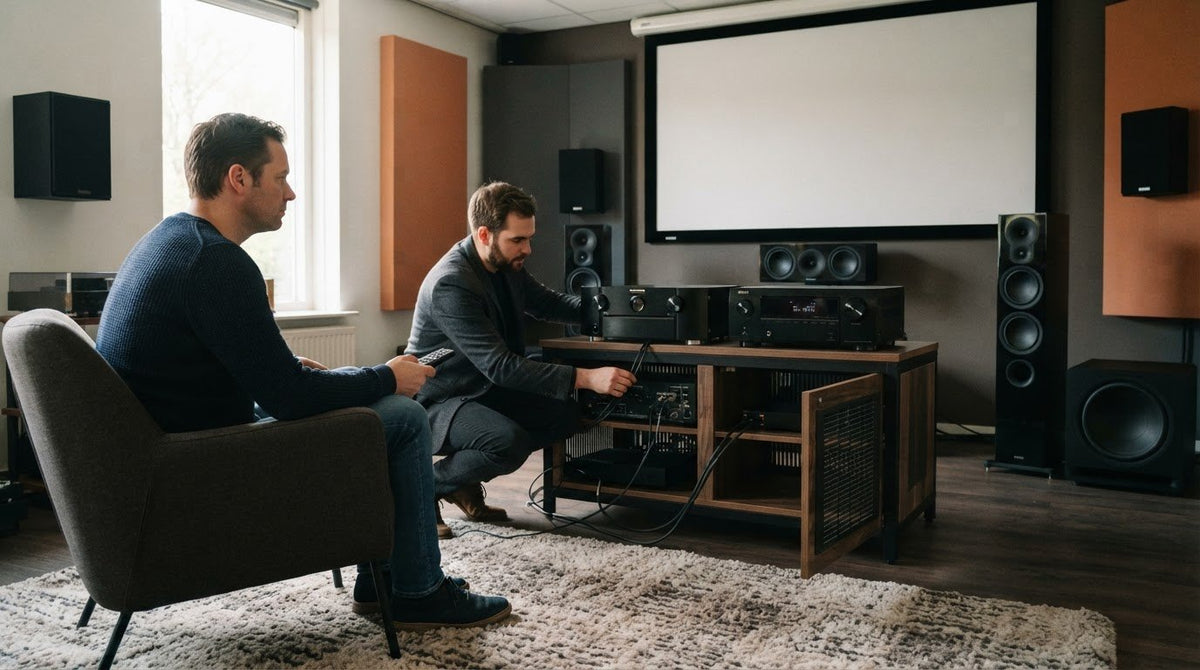
The Marantz Cinema 40 and Denon AVC-X4800H cannot simply be classified as the winner for pure stereo: your speakers, listening room and desired functions determine which one suits better. In a comparison between the Marantz Cinemaseries and Denon AVC receivers, you mainly see differences in design and options, while both receiver families support HDMI 2.1 and 8K. The Cinema 40 has nine amplifier channels and a specified power of 125 watts per channel.
Are you unsure between an Marantz Cinemaseries and a Denon AVC receiver? The right choice depends not only on the specifications, but also on your speakers, listening habits and the rest of your installation. In this comparison you can read what you can pay attention to regarding stereo, HDMI connections, room correction, specifications and price. This way you can determine which features matter most for your use.
Key points
- Discover which HDMI options are important for your television, game console and desired image quality.
- Learn how room correction helps to tailor the sound to your listening room.
- Compare the Denon AVC-X4800H and Marantz Cinema 40 on features that matter for stereo and home cinema.
- Identify specs and price points so you choose models that fit your needs.
- See how to combine an AV receiver with bookshelf or floorstanding speakers for a cohesive system.
HDMI support for 4K and 8K
When comparing Denon AVC and Marantz Cinemareceivers, HDMI is important for image and sound. The surround receivers of both Brands support HDMI 2.1 and 8K. HDMI 2.1 offers higher bandwidth and supports 8K video and advanced gaming features, among other things. This way you can connect a television, game console and receiver without just looking at the logo on the front.
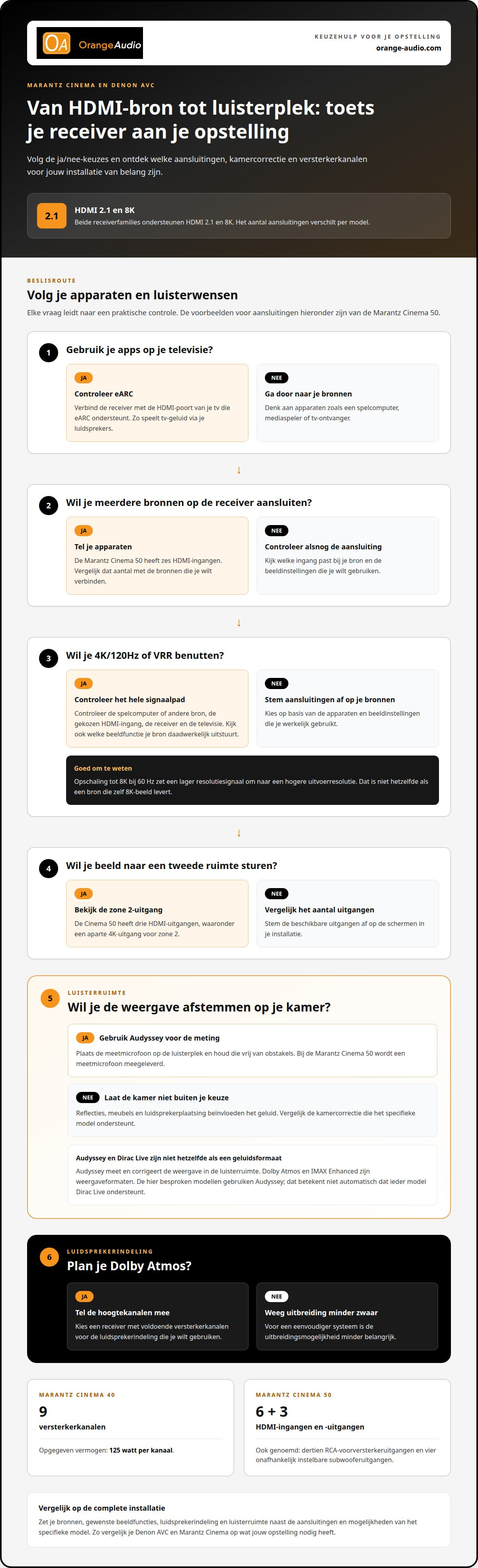
The Marantz Cinema 50 makes the connection options concrete. It has six HDMI inputs, suitable for 8K resolution and HDCP 2.3. Use the inputs, for example, for a game console, media player and TV receiver. The receiver also has three HDMI outputs. One of these is a separate 4K output for zone 2, useful when you want to send images to a second room.
For 8K sources, the Cinema 50 is equipped with upscaling to 8K at 60 Hz. Upscaling converts a lower resolution signal to a higher output resolution. That is different from a source that itself delivers 8K images. Therefore, look at the entire signal path: source, HDMI input, receiver and television must match the image mode you want to use.
The connections also count for games. Features mentioned include 4K/120Hz and Variable Refresh Rate (VRR). 4K/120Hz is intended for high frame rates at 4K; VRR adjusts the image refresh to the game console. Use a suitable input for this and check which image function your source actually outputs. This prevents a function from remaining on paper while a link in your installation does not use it.
eARC is useful if you use apps on your television. Connect the receiver to the HDMI port of the TV that supports eARC so that the sound from the television is played through your speakers. You connect other sources, such as a game console, to an HDMI input on the receiver.
Which connections, subwoofer outputs and expansion options do the receivers offer? The Marantz Cinema 50 has six HDMI inputs, three HDMI outputs, thirteen preamp outputs with RCA connections and four independently adjustable subwoofer outputs. Those preamp outputs are useful when expanding with external power amplifiers; the subwoofer outputs offer separate bass connection options.
Denon and Marantz support HDMI 2.1 and 8K, but the exact number of connections varies by model. Therefore, first compare your devices with the available inputs and outputs. Consider a television with eARC, a game console with 4K/120Hz or extra speakers in zone 2. For a home cinema setup with matching connections , also check how many sources need to be connected at the same time. This way you don't just choose based on resolution, but on the entire installation.
The Marantz Cinema 50 has six HDMI inputs, all capable of 8K resolution and HDCP 2.3. This allows you to check whether your sources fit the desired inputs when connecting. Check which connection you are using per device and adjust the choice to the image settings you want to use. This way you keep an overview of the connections in your installation.
Audyssey and Dirac room correction
The listening room influences the sound: reflections, furniture and the placement of speakers all play a role. Audyssey measures the display in the room and adjusts the settings accordingly. Denon and Marantzreceivers use Audyssey room correction. The measurement microphone allows the receiver to take the speaker layout and the listening room into account.
The Marantz Cinema 50 comes with a measurement microphone for Audyssey settings. Place it at the listening position during the measurement and follow the setting steps on the screen. Keep the microphone clear of obstacles so that the measurement can capture the room view. The correction focuses on the interaction between speakers and room, not on changing the recording itself.
Dirac Live is another room correction technology that you can find in receivers. Don't just compare the systems based on their name, but see which functions the specific receiver supports and makes available for your setup. The models mentioned here use Audyssey; This does not automatically mean that every model also supports Dirac Live. Assess the room correction that actually belongs to the model.
Which receiver suits your speakers, room and home theater setup? Choose a model with enough amplifier channels for the speaker layout you want to use and room correction to match. With Dolby Atmos, the height channels also count. For a simpler system, this expansion option is less important.
Audyssey is the practical tool for measuring and adjusting. The included microphone with the Cinema 50 supports the first measurement; then you can listen to well-known music or films and judge how it sounds. For example, use a scene with voices, ambient noise and low tones. Pay attention to whether dialogue remains intelligible and effects move clearly through the room.
Room correction is different from a sound format. Dolby Atmos and IMAX Enhanced are supported display formats; Audyssey measures and corrects the reproduction in the listening room. So Audyssey does not automatically create a missing speaker channel. Adjust the settings to the speakers you have actually installed.
Compare the receivers step by step. First determine your speaker layout, then see how many amplifier channels you need and then compare the available room correction. Also take the space into account: an open living room with hard surfaces reacts differently than a closed listening room with many soft materials. This way you compare Denon and Marantz on their suitability for your installation, not just on a function name.
Denon versus Marantz in home cinema amplifiers
Denon AVC and Marantz Cinema share a technical basis, but the brand names do not tell the whole story. With the Denon AVC-X4800H and Marantz Cinema 40, a forum pointed out an extra connection for an HDAM module in the Marantz. That forum user also stated that both models use the same DSP chip. Such similarities help with comparison, but do not independently determine what a complete installation sounds like.
A DSP chip processes digital signals, but the speaker layout, settings and connected equipment also play a role in the reproduction. It is sometimes stated that Denon and Marantz have their sound tuning done by different sound masters. That in itself says nothing about a measurable difference in quality. When you can evaluate models side by side, listen to music and movies you know well.
HDAM is a specific distinction mentioned in this comparison. The presence of HDAM in itself does not indicate how big an audible difference is. Speakers, placement and settings also play a role. Therefore, compare receivers based on their functions and connection to your system. Treat statements about sound as listening impressions, so that one technical term does not determine the entire choice.
Also pay attention to streaming and operation. See for each receiver how to connect sources and select the desired sound source, for example a film via a media player or music from a network source. In addition, check what information about the selected input appears on the screen. Clear operation makes daily use more pleasant, especially if several family members use the same installation.
Which warranty, service and sales points apply to Marantzand Denon receivers in the Netherlands? The specific conditions depend on the point of sale, the model and the purchase; there is no uniform term or service rule here for either Brands . Just as foreign electronics stores such as Kho điện máy 17 have their own range and service conditions for consumer electronics, this also differs per local dealer. Therefore, save your purchase details and view the conditions that apply to the specific receiver.
Compare the models step by step:
- Technology: compare connections and expansion options.
- Use: think about which sources you use every day, such as streaming or movies from a media player.
- Playback: listen to familiar recordings and scenes, with the same speakers and similar settings.
- Operation: rate how easily you can choose the input and sound source via the screen.
The Denon AVC-X4800H versus the Marantz Cinema 40 is therefore not an easy choice between two separate brand names. The shared DSP chip, the aforementioned HDAM connection and the different tuning give you concrete points of comparison. Weigh that against functions you actually use. This way you focus the choice on practical performance in your home theater, rather than on one technical claim.
Specifications and prices of Denon home cinema amplifiers
These amounts provide guidance when comparing, but do not in themselves determine which receiver suits your speakers and home cinema.
Start with your setup. Make a note of which sources you connect, how many speakers you use and whether you mainly listen to surround or stereo. Then compare the connections, the number of amplifier channels and the functions you need per model. Specifications vary per AVC model, so don't just judge them from the price or model name.
Also consider what you want to add to your installation. With an existing surround setup, the channel layout can be decisive. If you listen mostly to stereo, speaker connections and the way you use music sources may be more important than home theater features you don't need.
Also for Marantz , compare the specific models carefully. Price differences do not prove that receivers offer the same features or performance.
Use a comparison table to keep an overview. Write down the model name, price, channel layout, connections and desired features in separate columns. Only enter data that belongs to the specific model. This way you can quickly see which receiver supports your sources and which connections offer room for expansion.
Don't just compare the purchase prices. A receiver is part of a complete installation: your speakers, sources and room help determine what you need. Check whether the model fits your current system and your plans for expansion. A higher price is only relevant if the associated options match your use.
Finally, make a shortlist of two models, for example the AVC-X4800H and AVC-X6800H. Place their official specs next to your setup and highlight features you actually use. This turns a price overview into a targeted choice, with attention to surround, stereo and future expansions.
Comparison of Denon AVC and Marantz Cinemaflagships
For a fair comparison, the Denon AVC-X4800H and Marantz Cinema 40 are interesting reference points. A forum user stated that both models use the same DSP chip. That says something about a shared component, but does not independently determine their performance with music or films. Therefore, also compare the amplifier power, channels and functions that suit your speaker setup.
How do Marantz CINEMA and Denon AVC differ in amplifier power and number of channels? The Marantz Cinema 40 has nine amplifier channels and a rated power of 125 watts per channel; the Cinema 50 also has nine channels and delivers 110 watts per channel. The available data does not provide comparable power and channel figures for the Denon models listed.
At Marantz the number of amplifier channels varies between the models listed. The Cinema 60 delivers 100 watts per channel over seven channels. The Cinema 40 and Cinema 50 are both 9.4-channel receivers. That designation helps you understand the possibilities for a surround setup, but does not mean that every channel delivers the same power at the same time.
How do the models differ in Dolby Atmos, DTS:X, Auro-3D and IMAX Enhanced? The Marantz Cinema 50 supports Dolby Atmos, DTS:X, Auro-3D and IMAX Enhanced. MPEG-H and 360 Reality Audio are also supported. The available data does not specify these sizes per Denon model, so compare the exact model version before choosing a size as a deciding factor.
Which Marantz CINEMAseries AV receivers are there and what are the specifications? The said series includes Cinema 70s, Cinema 60, Cinema 50, Cinema 40 and Cinema 30. The Cinema 60 offers seven amplifier channels with 100 watts per channel; the Cinema 40 has nine channels with 125 watts per channel. The Cinema 50 is 9.4-channel, delivers 110 watts per channel and has four independent subwoofer outputs.
The four subwoofer outputs of the Cinema 50 provide a concrete extension point for bass. The Cinema 40 shares the 9.4-channel layout, but according to the stated specifications, does not have the same defined subwoofer outputs. Therefore, look beyond the channel number. Check which connections your subwoofers and any external amplifiers need.
Start a practical comparison with your speaker setup. Count how many speakers you want to control and determine whether you use height channels for Dolby Atmos. Then make a note of which formats, subwoofer connections and functions for music you need. This makes it clear which options add value to your installation.
Do you want to weigh the receivers against your entire system? See how different home cinema setups fit your needs for channels, music and movies. Then choose based on the features you will actually use.
The price can also be a factor. That amount is an additional point of comparison in addition to differences in amplifier channels and connections. Determine in advance which functions are necessary, so that you compare receivers on relevant properties.
The Cinema 40 has nine amplifier channels with a specified power of 9 x 125 watts; the Cinema 50 delivers 110 watts per channel. The Cinema 60 delivers 7 times 100 watts over seven amplifier channels. In addition, the Cinema 50 has 4 independent subwoofer outputs. Such concrete specifications make it easier to weigh power and connection options against your own wishes.
OrangeAudio: Home cinema
OrangeAudio helps you choose an AV receiver and speakers that suit your home cinema. Don't just look at the number of channels, but also take into account your room, listening areas and plans for expansion. This will give you insight into whether a Denon AVC or Marantz Cinema suits your setup.
Combine an AV receiver, for example, with bookshelf speakers for a compact space, or with floorstanding speakers for a different speaker setup. Also think about how you watch movies and listen to music. In this way, technical differences become relevant for daily use.
Do you already have speakers or are you unsure between two receivers? Discuss your wishes and setup with OrangeAudio. Contact us to discuss your home cinema choice.
Choose a system that grows with you
Base your choice on how you listen and watch at home. Make a note of what sources you use, what speakers you already have, and what you want to add later. This gives the comparison between Marantz Cinemareceivers and Denon AVC receivers a practical purpose: choosing a receiver that suits your plans, instead of just the longest list of features.
Also take your choice of speaker into account. Bookshelf speakers may suit a compact setup, while floorstanding speakers take up a different place in the room. Active speakers require a different connection than passive models. Coordinate these choices so that your system as a whole is correct.
Do you want to translate your wishes and setup into a suitable combination? Ask OrangeAudio for personal advice. With a clear view of your listening room and usage, the next step becomes easier. Discover the possibilities and build a system you will happily return to.
Frequently asked questions
Denon or Marantz: what is the difference in a home cinema amplifier?
Which difference matters to you depends on the specific model and your daily use. Compare two models side by side and note which connections, settings and operating steps you need. For example, consider switching between television, game console and music source. This way you discover which receiver suits your routine, without using the brand name as the only selection criterion.
Which HDMI 2.1, 8K and 4K/120Hz functions do the receivers support?
The function you want to use must match the settings of your source and screen. For example, set the desired picture mode on your game console and check whether the receiver and television transmit that mode. If you use multiple sources, assess each source separately. This way you can see where a setting needs to be adjusted and you avoid judging the receiver on a picture mode that the source itself does not output.
What differences are there in Audyssey, Dirac Live and other room correction?
Compare room correction under similar conditions. Do not move speakers or furniture between measurements. Then play the same music fragment and pay attention to voice reproduction, balance and bass. Write down your impressions and do not rely solely on an automatic measurement result. Sound preference is personal; listening will help you determine which setting suits your space.
What are the current Dutch prices of comparable Marantzand Denon models?
The current Dutch price is the price stated for the chosen model at the time of purchase. Therefore, compare exactly the same model name and version, and do not simply compare sales prices with regular prices. Record both amounts separately when they appear. This way you avoid comparing an offer of one model with the regular price of another model.