
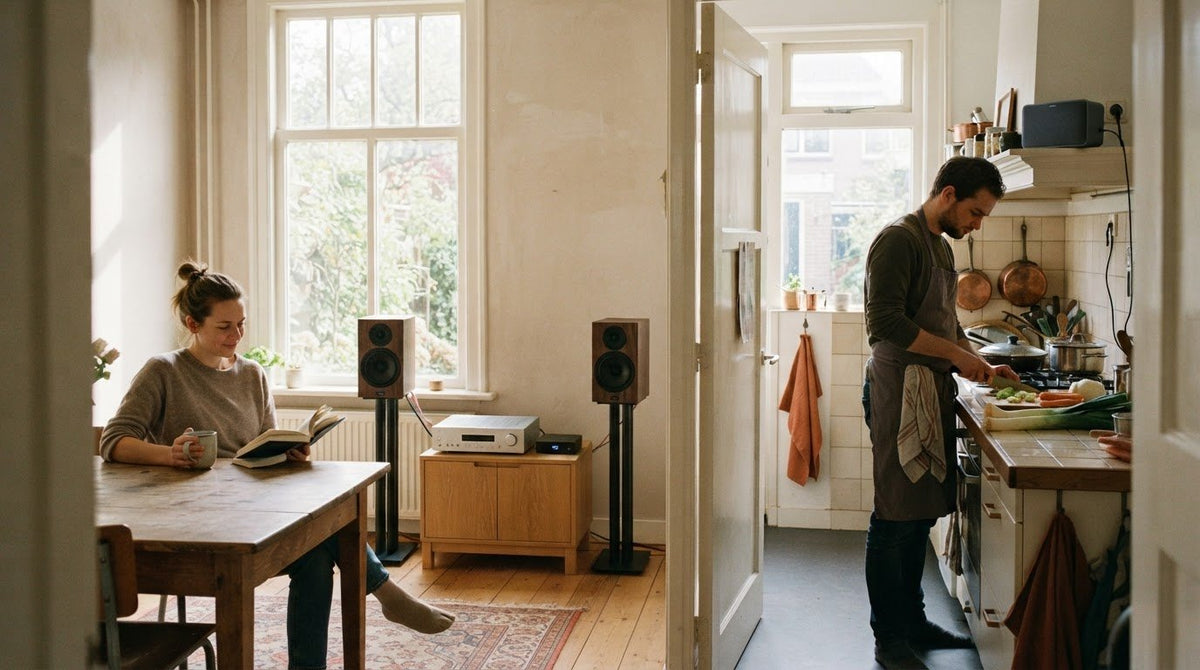
You don't have to immediately install new speakers in every room. For example, start with one wireless speaker and later expand the system to other rooms. Choosing a multi-room audio system starts with the question of how you want to distribute music: you play the same music in multiple rooms via WiFi and an app, or you choose something different per room.
Do you want to keep your existing speakers? That is often possible. With a streamer or amplifier you can make an existing installation part of a multi-room, so that you do not automatically have to replace everything. It does matter whether your speakers are active or passive and what equipment you are already using.
In this article you can read how multi-room works, how to control music per room and how to group speakers. You will also discover what role WiFi and the app play, how to expand existing speakers and what to pay attention to when making your choice. This way you determine which system suits your rooms, equipment and listening habits.
Key points
- Start with one wireless speaker and expand to the rooms where you want to hear music.
- Choose a suitable solution per room, such as a wireless speaker, built-in speakers, soundbar or streamer.
- Use the app to group speakers, distribute music, and control volume per room.
- A stable Wi-Fi connection helps smooth music playback in different rooms.
- Keep your existing speakers and discover how a streamer or amplifier can add them to a multi-room system.
Why should I choose a multi-room system?
With a multi-room system you can adjust the sound to different rooms and listening moments. For example, start with a wireless speaker in the kitchen and later add a solution for the living room or bedroom. For every room in which you want to hear sound, you need a speaker . This does not have to be the same type of equipment everywhere: wireless speakers, built-in speakers, soundbars and streamers can each play a role.
A compact wireless installation is suitable if you want to use separate hi-fi speakers without a large installation throughout the house. A streamer adds streaming capabilities to a suitable set; the speakers remain connected to the equipment that controls them. For example, the living room retains the existing hi-fi setup, while a compact wireless speaker in the kitchen plays background music. The choice therefore depends on your current equipment and the space you want to fill.
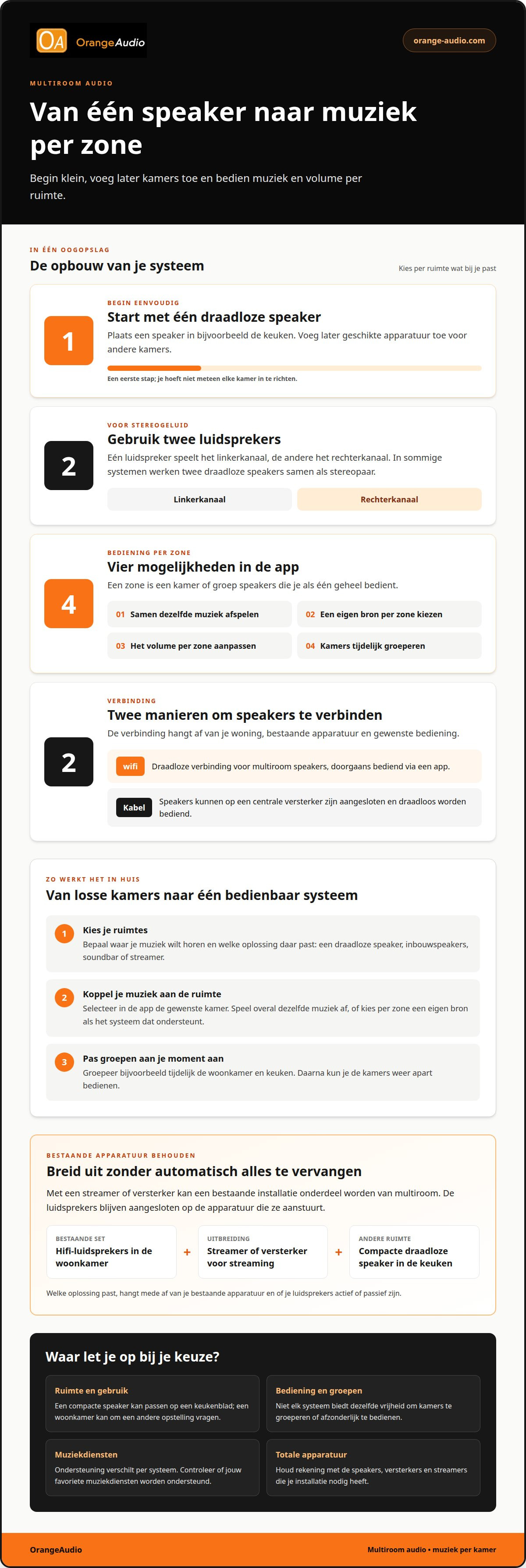
Do you want stereo sound in one room? You use two speakers for this: one plays the left channel, the other the right channel. Some multi-room setups allow two wireless speakers to work together as a stereo pair. For example, place them together in the living room and operate them as one zone. Other rooms can remain separate zones. This way you combine a stereo pair for attentive listening with one speaker for music while cooking.
Wireless multiroom speakers connect via WiFi and are usually controlled with an app on your smartphone or tablet. You can start with one speaker and add suitable equipment later. Take the size and function of the room into account: a compact speaker often fits better on a kitchen countertop, while the living room may require a different setup. For a discreet installation, built-in speakers are an option; an soundbar matches the television.
For a wireless home cinema set, you can connect speakers, an soundbar and a subwoofer together if the equipment supports this. Think of one soundbar near the television and additional speakers in the same room. This is different from distributing music to the bedroom: first decide whether you want to expand films, play music per room or combine both. The right equipment follows from that goal.
Which streaming services support multi-room audio systems? This varies per system and the services with which it collaborates. Therefore, before making your choice, compare the support for your favorite music services.
What are the privacy and security risks of smart speakers? A smart speaker is connected to your network and can process account details and operating information. Mitigate risks by consciously setting account security and app permissions. Only use voice control if that function is available on your equipment.
Operate music per room and speakers group
With multi-room control you determine which music sounds in which room. An app or controller brings the rooms and available resources together. The options differ per system.
Operation via app or controller
You can operate the speakers en rooms in your system with an app or controller. For example, use a smartphone, tablet or computer to start music and select the desired room. This means you don't need separate controls for each room. In a wired installation, the speakers can be connected to a central amplifier, while you operate them wirelessly.
Ease of use depends on how quickly you find the desired room and music source. Do you want to start music in the living room from the kitchen? Then it helps if the app clearly names the rooms and clearly displays the operating choices. Also check whether your music services are available from the controls. This way, daily use matches your listening habits.
Music and volume per zone
A zone is a room or group speakers that you operate as one whole. In a simple system the same music plays in all zones. Other systems let you choose your own source per zone or adjust the volume separately. For example, an album can be playing in the living room, while a podcast is playing in another room.
Groups are useful when you want to let rooms play together temporarily. For example, merge the living room and kitchen during a dinner party. Then you disband the group and operate the rooms separately. In the app you add or remove speakers to a group. This way you can tune the music to the moment, without changing the permanent layout of your home.
When choosing, pay attention to these operating options:
- Co-play: select multiple rooms for the same music.
- Custom source per zone: choose different audio for individual rooms.
- Adjust volume: adjust the level per zone to suit the activity and room.
- Groups manage: temporarily combine rooms and then operate them separately.
Not every system offers the same freedom to group rooms or operate them separately. Some only work with equipment within the same platform. Keep that in mind if you want to add speakers later. Choose a system that suits how you use the rooms: listening together requires different operation than different sources per room. This way you prevent the app or group division from making your listening moment unnecessarily complicated.
Speakers connect via WiFi and an app
A multi-room system connects speakers wirelessly via WiFi or wired via a central amplifier. The right connection depends on your home, existing equipment and desired operation.
The costs depend on the speakers, amplifiers and streamers you choose. The number of rooms and the connection method also play a role. Therefore, look at all the equipment required for your installation, not just one separate speaker.
Wifi, network and connections
Wifi connects speakers with the home network, so that you can operate them from an app. The range must be sufficient in every room; an unstable connection may interrupt playback. In a larger home, a mesh network can support range. The required coverage depends on the layout and location of the speakers.
An app usually guides you in adding rooms: connect a speaker with the network, add it to the system app and assign it a room. Repeat for each new speaker and group rooms if you want to listen together. The precise steps vary per system. Keep your smartphone and speakers connected to the home network during setup.
With a wired installation, speaker cables run to a central multi-room amplifier. It controls multiple speakers of zones; Operation can still be done via WiFi. This is useful for passive speakers that require an external amplifier. An existing amplifier or set with passive speakers can sometimes be expanded with a streamer or receiver on the audioinput. This way you keep the stereo system in the living room.
Models, homes and streaming choice
The suitable multi-roomspeaker depends on the room and the way you listen. A portable speaker offers flexibility as you move it, but runs on battery power as long as capacity allows. For a permanent setup in the living room, another solution is suitable, such as a stereo pair. Please note the supported music services per model and the connection to your existing equipment.
Which systems are suitable for Dutch homes and Spotify Connect? Sonos, HEOS, Bluesound and MusicCast are examples of multi-room systems. Choose a system that supports Spotify Connect and your other favorite music services. These systems do not work together as one multi-room platform. Keep this in mind if you want to expand later.
How do you connect existing amplifiers and passive speakers ? Connect a streamer to the audioinput of the amplifier and let that amplifier drive the passive speakers . Passive ceiling speakers may require a wired connection to a separate amplifier. This way you choose between wireless convenience and a landline connection, without automatically replacing your existing stereo.
Expand existing speakers with streaming
Do you want to choose a multi-room audio system and keep your current hi-fi set? Then start with the speakers and amplifier that you want to continue using. A separate streamer adds streaming to a stereo setup, while your existing equipment continues to play the music. The streamer retrieves audio via the network and sends it to the amplifier. This way you can expand the set in your living room without immediately replacing all the parts.
The connection depends on the devices you already use. Connect the streamer to a suitable audioinput on the amplifier. Then select the streamer as the source so that the sound is played through the connected speakers. If your amplifier has multiple inputs, other sources can remain connected. Think of a record player on one input and streaming on another.
Do you also want sound in the kitchen? Then that room needs its own speaker or connection to a multi-room amplifier. Passive speakers require an external amplifier. A central multi-room amplifier can control multiple speakers or zones. Depending on the device, you can adjust the volume per zone. This way you keep the existing set in the living room and add the kitchen as a separate room.
When choosing a multi-room audio system, how much you want to change also plays a role. You can add individual streamers to existing equipment or switch to a fully integrated system. The first approach is suitable if you want to keep your trusted amplifier and speakers. An integrated setup brings parts together, but may require additional equipment and a suitable location, for example in a hi-fi cabinet. Wired speakers may require cable routes through walls or ceilings.
Check which speakers you want to keep and how they are controlled. If they are passive, an amplifier remains necessary. If they are active, the connection depends on their inputs and the selected streamer. Also pay attention to the compatibility with your existing equipment and the music services that the streamer supports. This way, the expansion fits your listening habits.
- Keep your stereo: add a streamer to the existing amplifier.
- Add a room: choose your own speaker or an amplified zone.
- Plan cabling: take cables to passive speakers into account.
- Assess the setup: reserve space for streamer and amplifier.
A targeted expansion starts with the equipment you want to keep and the rooms you want to fill. Then determine how the streamer connects, where amplification is needed and whether you want to operate rooms separately. This way you can build on your current hi-fi system and not replace parts that still suit your listening needs.
What multi-room audio is
Multiroom audio distributes sound from a central point to speakers in different rooms or zones. That central point can be a streamer, amplifier or receiver. You can send music to multiple rooms, but also to one speaker. The term mainly describes how equipment works together, not one specific type of speaker.
Suppose you listen to an album in the living room and want to hear the same music in the kitchen. A multi-room system sends the audio signal to both rooms. Depending on the system's capabilities, you can let the rooms play together or operate them separately. This way the playback adapts to your listening moment.
The parts together form a chain. A music service or other source supplies the audio, a streamer or receiver processes it and one or more speakers reproduce the sound. In a multi-zone installation, a multi-room amplifier controls different speakers or rooms. An existing receiver can therefore be part of the setup, as long as the necessary connections and functions are available.
Wifi often forms the connection between network players and the controls. The app shows the rooms as separate parts, so that you can choose the living room, for example, without also including the kitchen. In wired systems, speaker cables run from a central amplifier to the rooms. Operation can still be done wirelessly. The connection between the equipment and speakers is therefore not always the same.
Bluetooth works differently than a system that brings together multiple network players. You typically connect a phone directly to a compatible speaker to play sound. Multiroom audio is aimed at dividing and operating audio in different zones. You can choose a multi-room audio system for multiple rooms, while Bluetooth is mainly suitable for one listening position.
Stereo is different from multi-room. Stereo uses two speakers for the left and right channels in one listening room. Multiroom describes how audio is distributed between rooms. You can choose a multi-room audio system that combines both applications: a stereo pair in the living room and a separate speaker in the kitchen, within the same multi-room environment.
The core is simple: look at the route of the music, from source to speaker. Determine which rooms need sound, which equipment processes the signal and how you want to operate the components. This makes it clear whether a separate streamer, receiver or multi-room amplifier is suitable. With this structure you can tailor the system to your home and existing equipment.
OrangeAudio: multi-room audio
OrangeAudio offers multi-roomaudio which allows you to distribute music to multiple rooms and take your listening needs into account. Consider a setup with Bookshelf Speakers for a compact listening place, Floor Standing Speakers for a more spacious room or Active speakers if you are looking for an integrated solution.
Which combination suits? That depends on the rooms you want to fill, the equipment you already have and how you want to control music. Map those points before putting together a system. This way you discover specifically which speakers and multi-room solution suit your home, without unnecessarily replacing parts.
Do you want to discuss your options? Contact OrangeAudio.
Take your listening plan to the next step
First decide how you want to listen to music at home and which speakers you want to keep. It will then become clear which extension is suitable. Choosing a multi-room audio system does not mean that you have to replace your existing set: tailor your plans to the equipment and rooms that are important to you.
Do you want to look further into a possible solution? Discover the possibilities and consider how they fit in with your listening room and daily use. Whether you are thinking of Bookshelf Speakers, Floor Standing Speakers or Active Speakers, focus your choice on a setup that you enjoy listening to.
View the Sonos options and take the next step towards music that suits your home.
Frequently asked questions
How does it work? multiroom?
The control sends an audio source to the rooms you select. For example, you can start a podcast in the office and add the dining room later, or use both rooms separately. For a smooth experience, it helps to consider in advance which sources you use every day and where you want to hear them. This makes it clear which control functions you really need.
What is multiroom audio?
Multiroom audio is a setup with which you send audio to different listening places in the house. It is about the cooperation between source, control and display equipment. This can be a compact installation or a more extensive unit with multiple zones. When assessing a setup, don't just think about music: podcasts and other audio can also be part of your listening usage.
What about compatibility between different Brands?
Compatibility depends on the connections and features that devices share. For example, check whether a streamer has a suitable audiooutput for your amplifier and whether the speakers appear within the same control system. A loose connection can send music to a hi-fi set, but does not automatically mean that that set gets all the app functions of another system. Therefore, make a distinction between transmitting sound and operating devices completely together.
What should you pay attention to?
Start with an overview of your listening places and sources. For example, note where you want to use radio, streaming or a record player and which devices are already available for this. Also consider practical placement: an speaker needs a suitable location and equipment must remain accessible for connections and operation. By listing these points in advance, you can determine more specifically which components fit into your installation.
What should you pay attention to when buying a multi-room speaker?
Pay attention to the dimensions, placement options and function of the speaker. A model on a bookshelf requires a different location than a speaker that is part of a fixed installation. Also consider whether you want to move the speaker or use it mostly in one place. In addition, compare the supported music services with your listening habits, so that your favorite sources are available.
What is a multi-room amplifier?
A multi-room amplifier controls multiple speakers or zones from one device. This can be a practical solution if you want to use fixed speakers in different rooms. When putting together, pay attention to the number of connections you need and the desired zone control. This way you can tune the amplifier to the layout of your home and the speakers you want to connect.
What is involved when putting together a system?
A good inventory makes putting it together clear. Write down which speakers you want to keep, which sources you use and where additional equipment can be placed. Then determine which parts work wirelessly and where speaker cables are needed. Also consider the controls: do you want to control everything from one app or are separate zones necessary? This creates a setup that suits your home and daily use.
Which multi-room audio systems are the best in 2026?
The best system is the one that connects to your equipment, music services and listening rooms. A ranking means little if it doesn't take into account your existing amplifier or the way you use rooms. Therefore, compare the operation, source support and expansion options of the systems you are considering. This way you choose based on practical suitability instead of a general title such as “best”.