

You can modernize old passive speakers with a streamer, but a streamer alone usually does not control them. You also need an amplifier for that. Is there already an amplifier in your cabinet? Then you don't have to immediately replace your entire installation. With the right combination, you can give your trusted speakers a new role and easily stream music.
Whether your speakers suits modern equipment depends, among other things, on the amplifier, the connections and the properties of the speakers. A separate streamer works together with an existing amplifier. A streaming amplifier combines both functions and can be connected directly to passive speakers . So you can choose between a small expansion and a clearer installation.
Discover step by step which route suits your set. We explain what a streamer does, when you can keep your existing amplifier and what to pay attention to when it comes to connections and amplification. This gives you a clear picture of the combination with which you use your speakers for streaming.
Key Points
- A passive speaker needs an amplifier. A separate streamer does not control your speakers independently.
- You can modernize old passive speakers with a streamer by connecting a streamer to your existing amplifier.
- Compare the options: keep your current amplifier, choose a streaming amplifier or replace your installation.
- Note the Brands, models and connections of your amplifier and speakers before choosing a combination.
- Determine which streaming functions you want to use and see which streamer and amplification suit them.
Old passive speakers Modernize with a streamer: what do you need?
Are your old ones speakers still usable? You can often continue to use them if they function well and match the amplifier in your installation. Modernizing old passive speakers with streamer does not automatically mean that you have to replace everything. You add streaming as a music source and tune the rest of the set to what you already have.
A passive speaker does not have a built-in amplifier. A separate amplifier makes the audio signal powerful enough to drive the speaker . A streamer brings in music via your network or another supported connection. That is a different function than amplification: a normal streamer does not control passive speakers independently.
What role do the streamer, amplifier and speakers?
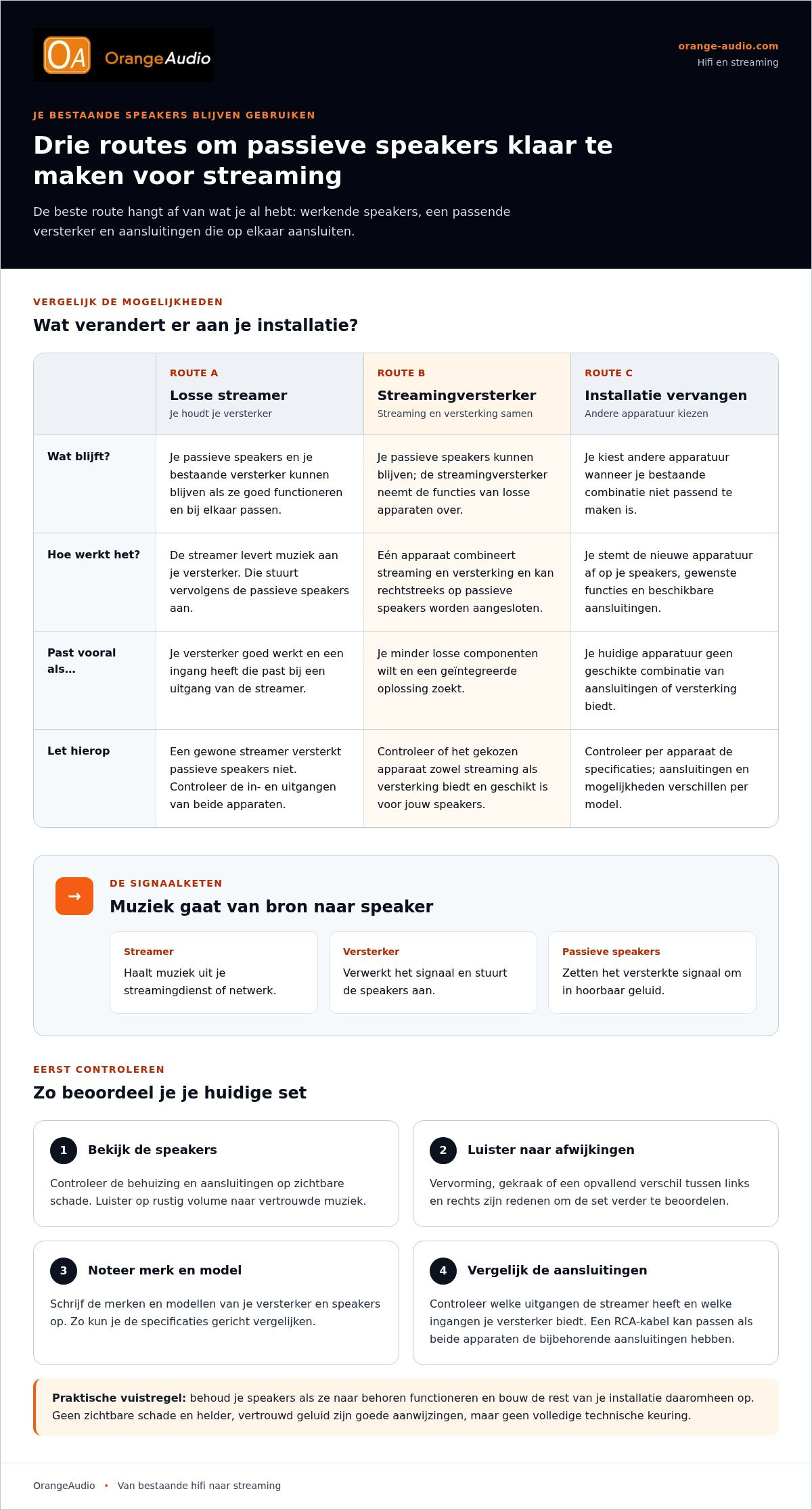
View your installation as a chain. The streamer picks up the music, the amplifier processes the signal and sends it speakers on. Streaming is the act of playing audio while receiving it over a network, rather than having to download an entire file first. The basic route looks like this:
- Streamer: pulls music from your streaming service or network.
- Amplifier: receives the signal and delivers the amplified audio signal to the speakers.
- Passive speakers: convert that signal into audible sound.
The connection between streamer and amplifier depends on the connections on both devices. For example, an analog connection can work with an RCA cable, but first check which inputs and outputs your equipment has. Then connect the speakers to the speaker outputs of the amplifier. A streaming amplifier combines the functions of streamer and amplifier, so you need fewer separate components.
When can you continue to use your existing speakers continue to use?
Start watching and listening. Check the housing and connections for visible damage. Then play familiar music at a low volume. If you hear distortion, crackling or a noticeable difference between left and right, it is wise to further assess the set. No visible damage and a clear, familiar sound are good indications, but not a full technical inspection.
Also include your current amplifier in that assessment. Speakers that sound good should still be combined with appropriate amplification. Therefore, make a note of the make and model of both your amplifier and your speakers. Also view the connections and check in the specifications whether the amplifier is suitable for the speakers. This way you avoid choosing a streamer that you cannot properly connect to the amplifier.
The practical rule of thumb: keep speakers if they function properly and build the rest of your installation around them. If you want to compare existing speakers with other models or sizes, also view the bookshelf speakers. If you know the condition of your speakers and which amplifier and connections you have, you can choose a more targeted next step.
This is how a streamer works with your existing amplifier
Does your amplifier work well? Then it can remain the link between a new streamer and your passive speakers. The streamer supplies the music signal, the amplifier processes it and controls the speakers. In short: the streamer brings in the music, the amplifier makes playback via your speakers possible.
When modernizing old passive speakers with streamer, the connection between those two devices is an important point of attention. Don't just look at the shape of the plug. The output of the streamer must match an input on the amplifier. Which connection you can use differs per device.
Which connections should you check on your installation?
First make a note of the connections on the back of your amplifier. See which analog and digital inputs are available. Then check the manual or product specifications to see which outputs the streamer has. Compare that data before choosing a cable. A connection to one device does not necessarily have to be available on the other.
If the streamer has an analog output and the amplifier has a suitable analog input, an RCA cable may be an option. Only use this if both devices have the corresponding connections. With a digital connection, the input on the amplifier must be able to process the signal. The names and options differ per model, so consult the documentation of your equipment.
Make it easy for yourself: copy the names of the connections literally or take a photo of the back panels. This way you can compare calmly and avoid choosing a cable based solely on the shape of the plugs. Also note which input of the amplifier you connect the streamer to. You will select that input later to play music.
What changes if your amplifier does not have a suitable input?
Is a suitable input missing? First check whether the streamer has a different output that fits your amplifier. If there is no suitable combination, another streamer or an amplifier with suitable connections may be required. Based on the data of the specific devices. Not every streamer has the same outputs and not every amplifier can process every signal.
An integrated solution is an option if the chosen device offers both streaming and amplification. Such a streaming amplifier can replace the separate streamer and existing amplifier and control the speakers directly. Make sure that the device is designed for this. The word 'streamer' in itself does not mean that an amplifier is built in. If you want to explore your amplifier choice further, also read the guide to a hi-fi amplifier.
So start with the connections, instead of assuming that you need one specific type of cable as standard. Check out the floor standing speakers if you also want to compare different speaker types. Match your streaming and amplification choices to the set you want to continue using.
Streamer with old speakers: which modernization route suits you?
You do not automatically have to replace your entire installation to stream music. The best route depends on what you already have, what connections are available and how many separate devices you want to use. Keep one difference in mind: a regular streamer does not drive passive speakers directly. For this you need a suitable amplifier.
Use this equation as a starting point. Then assess the connections and operation of your own equipment, so that you do not replace more than necessary.
| Route | Required | What do you keep? | Point of attention |
|---|---|---|---|
| Streamer on existing amplifier | A separate streamer and a suitable connection between the two devices | Your current amplifier and passive speakers | The amplifier must work properly and have an input that matches the streamer. |
| Streamer with built-in amplification | A streaming amplifier that is suitable for your speakers | Your passive speakers | The streaming amplifier usually replaces the separate streamer and existing amplifier. |
| Complete replacement | A new combination of music source, amplification and speakers | None or only part of your current set | This is especially suitable when your current components are not usable for the desired setup. |
When does a streamer on your current amplifier make sense?
This route is suitable if your amplifier works properly and has a suitable input for the streamer. You then keep both your amplifier and your speakers. The streamer adds access to music sources and a new way of operating. The existing amplifier remains the part that powers the speakers . This way you can modernize in a targeted manner without immediately replacing the entire set.
Check whether the output of the streamer and the input of the amplifier match. Also make a note of which input you use, so that you can easily select the correct source on the amplifier after connecting.
When is a streamer with built-in amplification better?
If you want fewer separate devices and connections, a streaming amplifier can make your installation more organized. It combines streaming and amplification in one device and can control passive speakers directly, if the device is suitable for your speakers. Therefore, check the details of the speakers and the amplifier function before choosing this route.
A complete replacement is a bigger step. This may make sense if your current amplifier does not work properly, does not have suitable connections or if you consciously want to put together a new combination. If your amplifier still works well, preservation may be the easiest route. There is no universal choice: tailor your decision to your installation and your preference for simplicity or preservation.
If you want to modernize your old passive speakers with a streamer, first determine which part you want to keep. Then explore the features you care about in the guide to buying a audio streamer . Also compare the possibilities of multi-room audio if you want to stream in multiple rooms.
Modernize your existing installation: follow these steps
Good preparation makes connecting easier. First collect the details of your equipment and then determine which parts you want to keep. This way you can modernize old passive speakers with a streamer without randomly combining cables or devices. Work quietly and follow the manuals for device-specific instructions.
First make an overview of your existing equipment
Note the make and model of your amplifier and speakers. Also write down the available inputs and outputs. Look at how the speakers are connected to the amplifier and note which music sources and streaming services you want to use. Finally, decide what is more important to you: keeping your current amplifier or simplifying the installation with fewer separate devices.
- Map your set. Gather the details of your amplifier and speakers. Note the connections you can actually use, not just what you see in a photo or in a product overview.
- Choose your route. Decide whether you connect a separate streamer to your current amplifier or prefer to use a device that combines streaming and amplification. With the second choice, check whether the built-in amplifier is suitable for your passive speakers.
- Compare the connections. Check which output the streamer has and which input on the amplifier matches it. Only then choose a cable. Consult the manuals if the connection names are unclear.
- Turn off the equipment. Turn off the amplifier and streamer before connecting cables. Follow the connection instructions in the manuals and use the correct inputs and outputs. Also check whether the speaker cables are properly connected to the amplifier.
- Start with a quiet test. Turn on the equipment and select the input to which the streamer is connected. Start playing at a low volume. First check carefully whether everything works before increasing the volume.
- Check the sound step by step. Listen to see whether both speakers sound and whether it sounds familiar. Then check the selected music source and the volume control. Adjust settings one by one so you hear what each change does.
Connect and test without unnecessary settings
For the first listening test, choose a piece of music that you know well. If you don't hear anything, first check whether the streamer is playing the correct source and whether the amplifier is on the correct input. Also check whether both speakers are connected. Do not change multiple settings at the same time. Start with the simplest check and test again after each change.
If the basics work, listen to several familiar excerpts at a comfortable volume. This way you can assess the set as you use it at home, without immediately changing all kinds of additional settings. View appropriate audio streamers and amplifiers and compare the connection options with your overview.
Choose a suitable streamer for your new hi-fi set
You now have the most important information about your installation in view. Use them as a starting point for your choice: which amplifier do you have, which inputs are available and which functions do you want to use on a daily basis? This will prevent you from choosing a streamer that does not fit well with your set or offers functions that you do not need.
Make a short list of the make and model of your amplifier, the available connections and the music sources you want to use. Also note how you want to control the music and whether you only want to stream in the listening room or possibly also in other rooms. Compare those wishes with the streamer's product details. Check the connections and features per device and do not assume capabilities that are not listed.
Which streaming features are relevant to your use?
First consider your listening habits. Do you mainly use a streaming service, do you also play music files from your own network, or do you want control from a specific environment? Your answers will help determine which features are important. If you want to listen in multiple rooms, take that wish into account immediately. Not every streamer offers the same operating options or functions for multiple rooms.
Roon Ready may be relevant if you use Roon or are consciously looking for that option. It is a feature of certain streamers, but in itself says nothing about the connections or other functions of a specific device. Assess those points separately based on the product data. If you do not use Roon, do not let that designation outweigh the connections and functions you do need.
This is how you take the next step towards modern sound
Does your current amplifier suit your speakers and does the set work as desired? Then a separate streamer can be a targeted addition, as long as the connection is correct. If you want fewer separate devices, compare a solution with built-in amplification and check whether it is suitable for your passive speakers. The best route for you depends on your installation and the use you have in mind.
Use your overview of amplifier, connections and desired functions when comparing streamers. The audio streamers from OrangeAudio provide a starting point to explore the possibilities. If you also want to better understand your amplifier choice, consult the guide to a hi-fi amplifier. This way you choose a solution that adds streaming and fits the speakers that you want to continue using.
Take the time to compare functions and connections. Discover the audio streamers from OrangeAudio and explore which options suit your hi-fi set.
Give your trusted speakers a new place in your listening routine
A new hi-fi set does not have to mean saying goodbye to equipment that still suits you well. Think of the streamer as a way to expand your listening routine. Take ease of use, connections and the role that your existing amplifier continues to play into account. This way you make a choice that also feels logical in the long term.
If you want to modernize your old passive speakers with a streamer, compare the functions you are looking for with your existing installation. Think about how you listen to music and what controls you like. OrangeAudio is specialized in hi-fi and offers streamers, amplifiers and speakers for different listening needs.
View the options and determine which step suits your set. Discover the audio streamers and renew your hi-fi set step by step. With a well-considered choice, you give your trusted speakers space for new music and listening moments.
Frequently asked questions
Can I stream music without WiFi?
Yes. If your streamer has an Ethernet connection, you can connect it to your router with a cable. You don't need WiFi for that connection. For online music services you do need a working network connection and internet. If your streamer has Bluetooth and the source supports it, you may be able to play directly from a paired device. Check the options of your model in the manual.
Is a Roon Ready streamer necessary for every listener?
No, Roon Ready is only important if you want to use Roon. Roon can bring your local music files and supported streaming services together in one music management environment. This can be useful if you manage an extensive music library in different places. If you prefer to listen via a music service's own app, then that method of operation may suit you better. Compare the options with the operation you prefer.
Can I also connect my record player to a streamer?
This is possible if the streamer has a suitable audioinput, but many streamers are intended to output music to an amplifier. You often connect a record player to a suitable input on the amplifier. If the record player does not have a built-in pre-amplification, a Phono‑Vorverstärker are required. If you want to play vinyl through the streamer, check whether it can process and transmit the incoming signal.
How do I know if my speakers still sound good?
You can help locate a problem by swapping the left and right speaker cables at the amplifier. Turn off the equipment first. If the problem moves to the other side, the speaker or cable may be the cause. If it remains on the same side, also look at the amplifier, source and connection. This way you avoid writing off an speaker too quickly.
What happens if the streamer does not produce any sound?
Try to narrow down the problem instead of immediately changing settings. If another source is playing through the same amplifier, the speakers en amplifier is probably working at that moment. Then check in the control app that the music is being sent to the intended streamer and that playback has not been interrupted. Then consult the manual for any source settings of the device.
Can I expand my old speakers later to multi-room audio?
That may be possible, depending on the platform and the devices you add. Make sure the streamer works with the solution you want to use later. For example, an additional room could use a suitable wireless speaker or an additional combination of streamer and amplification. Also see if you can operate the rooms separately, so that you do not always have to play the same music everywhere.
Do I need a subscription to a music service for streaming?
No, not for every way of listening. Depending on the options, a streamer can play music from your own collection of files or via a music service. Some services or features may require a paid subscription. This varies per provider. The streamer is the device that plays the source, not automatically a music subscription. Therefore, check the terms and conditions of the service you want to use.