
The most expensive speaker does not automatically make your multi-room sound more stable. Choosing a stable multi-room audio system starts with the coherence between your WiFi, streaming services, devices and listening rooms. Because the system sends music to the speakers via your home network, a reliable connection is important.
You want to play music easily, without unnecessarily complicated controls or connection problems. You also want to know what you are paying for and whether you are connecting existing equipment. Therefore, compare streaming options, network connections and compatibility. Also consider whether you want to hear the same music in multiple rooms or play something different per room.
In this article you will discover how to compare options based on price, streaming, WiFi, compatibility and speaker choice. You can read what to pay attention to with AirPlay 2 and Google Cast, how to assess the influence of your home network and which setup suits different rooms and listening habits. This way you can choose a system that suits your home and the way you enjoy music.
Key points
- Choose between AirPlay 2 and Google Cast based on the devices and streaming services you use.
- Compare systems not only on purchase price, but also on sound quality, operation and expandability.
- A strong, stable home network connection helps avoid interruptions when playing in multiple rooms.
- Tune the speakers to the function and layout of each room, and decide whether you want to hear the same music everywhere.
- Discover how multiroom audio, streamers and different types of speakers fit your needs and home.
AirPlay 2 and Google Cast for multi-room streaming
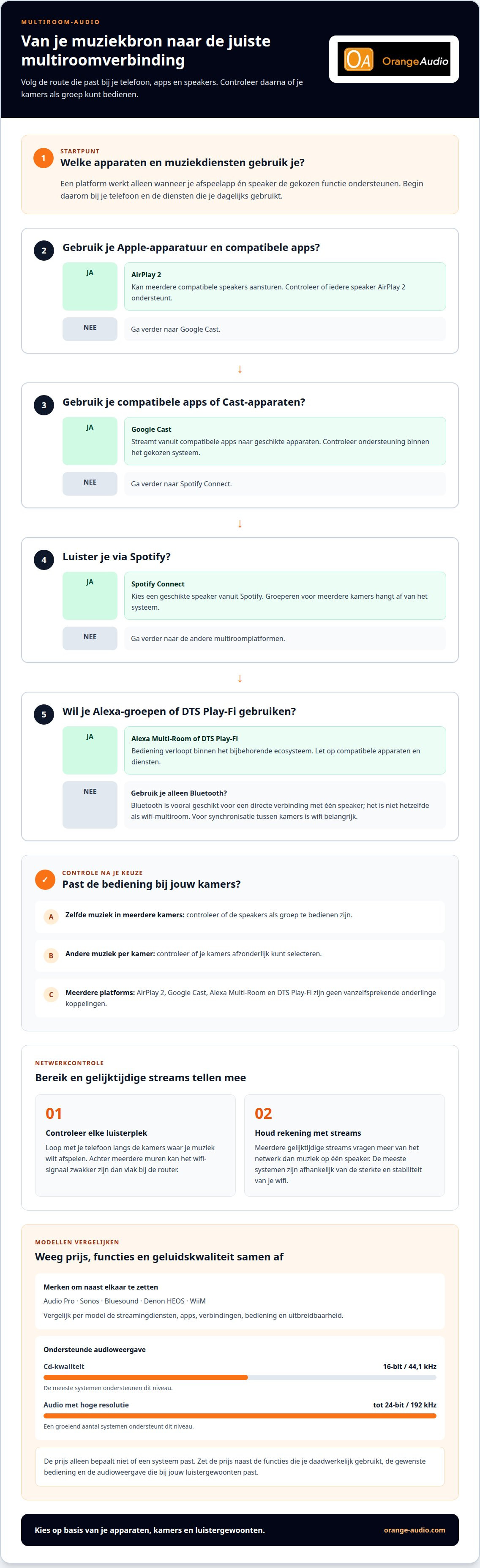
Yes, multi-roomaudio works with AirPlay 2, Chromecast and Spotify Connect when the speakers or devices support those features. Bluetooth is mainly suitable for a direct, one-time connection; WiFi is important for synchronization between rooms. Therefore, check which playback methods and sources are available per speaker what playback methods and sources are available.
AirPlay 2 connects compatible devices to Apple equipment and can control multiple speakers . Google Cast, commonly used over Chromecast, streams from compatible apps to eligible devices. In both cases, support by both the playback app and the speaker is decisive. An iPhone and a Google Cast-speaker do not automatically form one operable whole.
Spotify Connect works with speakers that support this function. You choose the speaker from Spotify, but simultaneous playback in multiple rooms depends on the group function of the system. If you want to hear the same playlist in the kitchen and living room, check whether you can operate the devices as a group. For separate music per room, you must be able to select rooms individually.
Alexa Multi-Room is another route: suitable devices can be controlled via Alexa groups. DTS Play-Fi also provides a platform to use compatible devices for multi-room. AirPlay 2, Google Cast, Alexa Multi-Room and DTS Play-Fi are therefore not self-evident connections. For each ecosystem, pay attention to the devices, apps and streaming services you already use.
Compare the options using this table. Which option is practical depends on your phone, favorite apps and desired operation.
| Option | Operation | What to look out for |
|---|---|---|
| AirPlay 2 | Apple devices and compatible apps | Support on any speaker |
| Google Cast | Compatible apps and Cast devices | Support within the chosen system |
| Spotify Connect | Spotify app to appropriate speakers | Grouping may vary by system |
| Alexa Multi-Room or DTS Play-Fi | Operation within the associated ecosystem | Compatible devices and services |
| Bluetooth | Direct connection to a speaker | Not the same as Wi-Fi multi-room |
Start with an overview of your phone platform and the music services you use every day. Then choose a system that supports this combination. This way you prevent a stereo setup or extra speaker from becoming disconnected from your existing listening habits.
Compare prices and product specifications
Compare not only the purchase price, but also the streaming support, controls and sound quality. This way you can see which functions actually add something in your rooms.
Audio Pro, Sonos and Bluesound
Audio Pro, Sonos and Bluesound offer various options for multi-room display. Compare which streaming services, apps and connections are supported per model. For example, Spotify Connect or Google Cast may be more important to you than a long list of extra features. Also see if you can add speakers to the same setup later. Price alone doesn't determine whether a system fits: that depends on the features you use and your listening habits.
Multi-room platforms and models
A platform determines how you group devices and control music per room. Compare AirPlay 2, Google Cast and DTS Play-Fi for compatibility with your phone, apps and speakers. Then check which controls and streaming sources are available per model. For sound quality, you can take the supported audio playback: most systems support CD quality, 16-bit/44.1 kHz. A growing number support hi-res audio up to 24-bit/192 kHz.
Reliability of Sonos, Bluesound, Denon HEOS and WiiM
Rate Sonos, Bluesound, Denon HEOS and WiiM on the same practical points: a stable connection, clear operation and support for the services you want to use. A brand name alone does not determine how reliably music plays in the home. Your home network and app and device compatibility also count. Therefore, compare the features of the models you are considering and pay attention to how easily you can group or control rooms individually.
Available multi-room audio systems
In the Netherlands you can compare systems and devices from Audio Pro, Sonos, Bluesound, Denon HEOS and WiiM, among others. AirPlay 2, Google Cast and DTS Play-Fi are also relevant platforms to pay attention to; they are not speaker brands, but ways to control compatible devices. View the price and specifications side by side for each model. Make a note of streaming sources, sound quality and expandability.
Make your comparison concrete: first determine your favorite music sources, then choose the desired controls and then compare models by price and supported audio quality. This way you weigh the functions against what you actually use, instead of paying for options that play no role in your listening room.
Wifi router range, bandwidth and possible outages
A multi-room system uses your home network to stream music to Wi-Fispeakers . Most systems therefore depend on the strength and stability of your WiFi. The signal may be weaker behind several walls than near the router. Multiple simultaneous streams also require more from the network than music on one speaker. If you want to choose a stable multi-room audio system, check the WiFi coverage in the places where you listen.
Walk with your phone to the rooms where you want to play music. Pay attention to places where WiFi drops out or responds slowly, for example in a bedroom at the back of the house. This gives you a practical impression of places where an speaker may be less stably connected. Also check whether other devices use the network intensively when you stream. Interruptions can be caused by the range, congestion on the network or the connection between speaker and router.
A WiFi repeater can increase the range and signal strength. A mesh network distributes WiFi through multiple access points. Both solutions remain dependent on your home network and the placement of the equipment. Place a repeater or mesh point in a place where the router signal is still usable, not where WiFi is already dropping out. This way the signal can be passed on further.
Wifi is essential for a full-fledged multi-room ecosystem. Bluetooth is especially useful for a fast, one-time connection to one speaker. The range of Wi-Fi and Bluetoothspeakers depends on the router, its placement, and obstacles such as walls, among other things. A WiFispeaker can sync with other speakers . For a fixed installation you can also use an Ethernet cable if the speaker has a network connection. That wired connection can provide a stable route to the home network.
Also consider the power supply. Most multi-roomspeakers must be permanently connected to a wall socket. There are also portable WiFispeakers with a battery, which may require compromises in power and sound quality. Therefore, first determine whether the speaker is usually in one place or is moved often. For example, a kitchen speaker requires a different practical choice than an speaker for outdoors. Choosing a stable multi-room audio system also means considering where and how you use speakers .
- Choose Wi-Fi for synchronization between rooms.
- Use Bluetooth mainly for a direct connection to one speaker.
- Improve coverage with a well-placed repeater or mesh point.
- Consider Ethernet for a speaker with a network connection.
Compatibility between Brands and ecosystems
A multi-room system works most smoothly when speakers and controls support the same standards. A device from another brand is not automatically compatible. Therefore, look at the app used, supported connections and options for joint control per model.
The Sonos ecosystem is aimed at operating compatible Sonos-speakers via the accompanying app. This does not mean that every wireless speaker from a different brand becomes part of the same room group. If you want to combine an existing speaker , look for a shared standard, such as support for AirPlay 2. Even then, functions may differ per device. Make sure that the desired speakers play together and can be selected from the same control.
If you use Amazon Alexa, also include the link with your smart home in the comparison. An speaker that works with Alexa is not automatically fully compatible with every multi-room platform. Voice control, music playback and speakers grouping are different functions. Check which ones are supported per model. This way you avoid buying a speaker that responds to your voice, but does not participate in the desired music distribution.
Also pay attention to the telephone and apps that you use every day. Your iPhone or Android phone and your music service can all affect operation. For example, Spotify Connect can transfer music to a compatible speaker send, while grouping depends on the capabilities of the system. So one shared control screen does not automatically mean that Brands fully work together.
Use this check before combining devices:
- Note make and model of each existing speaker.
- Compare supported standards and apps per device.
- Check whether rooms can be controlled together and separately.
- View which Amazon Alexa features are available on the model.
- Assess whether the control works with your phone and music services.
Treat compatibility as more than a check mark at 'wireless' or wireless. The same network connection does not automatically mean that devices belong to the same ecosystem. A shared standard can help, but it doesn't guarantee the same features or sound quality on every device. Therefore, first make a list of your current speakers and desired operation. Only then choose new models. This way you maintain control over your setup and prevent an additional speaker from becoming a standalone system.
Speaker choice for different rooms and usage situations
The right speaker choice depends on the layout of your rooms and your listening habits. Determine per room whether you want background music, focused listening or the same music as elsewhere. A kitchen and living room do not naturally require the same type of speaker.
A bookshelf speaker can be practical in a compact room; in a larger living room, a floorstanding model may better suit your listening needs. Also look at where the speaker will be placed and how you will use the space. In a bedroom, simple operation can outweigh powerful playback. In an open living space, the distribution of sound can be important.
Make a list of your streaming services and daily operating habits. Think of Spotify, the system app and the phone you use. Check if your favorite service is available directly and how to select rooms. A multi-room system is more pleasant to operate if, for example, you start music from one app and easily switch between the kitchen and living room.
Also take expandability into account. You can start with speakers in the rooms where you listen most often and add other rooms later. This works smoothly if new devices fit within the same ecosystem or support a shared standard. Therefore, compare not only your current setup, but also the options for expanding it later.
Check under privacy, software updates and lifespan which data the control app uses, how updates are offered and whether you can operate the system without a voice assistant. In addition, check what information the manufacturer provides about software support and whether you will later speakers you can add.
Sound quality also has technical differences. Many multi-room systems support CD quality (16-bit/44.1 kHz), but support varies per system. Some systems support hi-res audio up to 24-bit/192 kHz; check with the manufacturer whether your system and sources support this quality. Determine whether that difference is relevant to your listening use. Higher supported audio quality is not a substitute for an speaker that suits the room.
- Link each room to a listening purpose, such as background music or attentive listening.
- Compare your streaming services, controls and expansion options per model.
- Choose speakers that suit the room and your daily routine use.
Make a map of your rooms and listening needs and discover multi-room setups that match.
OrangeAudio: Multi-room audio
OrangeAudio offers multi-room audio for those who want to play music in multiple rooms and are looking for equipment that suits the home and listening needs. If you have any doubts about the combination of speakers, control and streaming after comparing, discuss your wishes with OrangeAudio.
Start with the rooms in which you want to hear music. Do you want to listen attentively in the living room and background music in the kitchen? Then every room does not have to have the same speaker . OrangeAudio offers bookshelf speakers, floorstanding speakers and active speakers. The appropriate choice depends on the room, your listening needs and how you want to use the equipment.
Your existing equipment and daily listening habits also count. Consider the streaming services you use, the controls you like and whether you want to hear the same music per room. Discuss what equipment you already have and where you want to expand the system. This makes it clear what should be central when putting together a multi-room setup.
Good preparation does not have to be complicated. Note the rooms, the use per room and any preferences for speaker size or placement. Also mention which streaming services and devices you use. With this information you can discuss more specifically how different speakers and multi-room equipment suit your needs. You don't need to know all the technical terms: start with the music and controls that are important to you.
If you want to add extra rooms later, consider expandability in your choice from the start. Discuss what role your current equipment will play and how you can keep the controls clear. This way you not only look at the first listening moment, but also at the coherence of the setup in the longer term. A suitable combination is about more than just individual specifications: the equipment must match how you listen at home.
OrangeAudio is a next step if you have compared the options and want to make a choice for your rooms, speakers and listening habits. Contact OrangeAudio to discuss your multi-room needs.
Create a suitable setup for your listening needs
You don't just choose an audio system for an ideal listening evening. Also think of the moments when music naturally becomes part of your day. This way you judge your choice on daily use, not just on paper.
If you want to choose a stable multi-room audio system, it is a good idea to first determine the main priority: easy operation, listening pleasure or space to expand later. Keep that priority as a guideline when comparing specs and capabilities. This makes the final decision more personal and clear.
You do not have to make every technical detail decisive. Start with what really matters to you and prioritize that desire. This creates a clear basis for a choice that will remain pleasant in the long term.
See how OrangeAudio can translate your listening wishes into a suitable setup and discover the options for your next step.
Frequently asked questions about multi-roomaudio
Which multi-room systems support Spotify, Apple Music, Qobuz and internet radio?
Support depends on the speaker, streamer and associated app. Spotify Connect only works if the chosen device supports this feature. You can play Apple Music via compatible devices and connections, such as AirPlay. Check with Qobuz and internet radio whether the service is available directly in the app. If a service is not listed, another compatible playback route can sometimes provide a solution.
What WiFi and network requirements are needed for stable multi-roomaudio?
You need a home network that reaches the rooms with speakers and remains stable during streaming. Place the router as freely as possible and prevent thick walls from weakening the signal to an important listening room. If coverage is poor, a well-placed mesh point or repeater can help. If a device has a network connection, a wired connection may be an alternative to WiFi.
How do you prevent stuttering and synchronization problems in multiple rooms?
Start in the room where the sound is stuttering: check the WiFi coverage and the placement of the speaker. Then restart the app and playback device if the connection continues to fail. Use one system app to group rooms and avoid different play paths for speakers who need to play together. If the problem only occurs in one room, first focus on that location and the network connection there.
What do multi-roomspeakers and systems cost in the Netherlands?
The costs differ per speaker, number of rooms and required reinforcement. Expanding an existing installation requires different equipment than a complete setup with speakers in multiple rooms. Therefore, compare the price of the parts you actually need. Free same-day shipping only applies within NL, BE and DE, for orders before 6:00 PM that are in stock. There is free parking directly in front of the door. Payment details are processed securely and not stored; OrangeAudio has the Thuiswinkel Waarborg webshop quality mark. All product reviews shown are from buyers of the product in question.
Which multi-roomspeakers have the best sound quality per price range?
There is not one speaker that is the best choice for every room. Compare models within your budget for suitability for the room, the type of speaker and the features you actually use. A compact speaker can be suitable for background music, while attentive listening has different requirements. Therefore, assess the sound quality in relation to your listening position, music preference and desired setup.
Can you combine different Brands speakers in one multi-room system?
Yes, that is possible if the devices support a shared platform or a compatible standard. For example, a network player can connect a traditional hi-fi system to your home network. A passive speaker system with an amplifier usually does not have a WiFi or network function itself; the player or amplifier then determines how it connects. Also check whether you can group the devices together, and not just play music separately.
How easy is multiroom-audio to install and operate?
Many systems can be controlled via an app, but the installation varies per device. First connect the speaker to your home network and then use the app to set the playback space. Then add other compatible ones speakers toe and give each room a recognizable name, such as 'kitchen'. This makes it easier to select the right room and prevents confusion during daily use.
Which systems work with Alexa, Google Assistant or Apple HomeKit?
Support for Alexa, Google Assistant and Apple HomeKit varies by brand and model. Check for each device separately which assistants and features it supports. For example, voice control can start music, but it doesn't automatically mean you can group all speakers together. Also consider whether you need an assistant: an app may suffice if you prefer to select music and rooms yourself.