
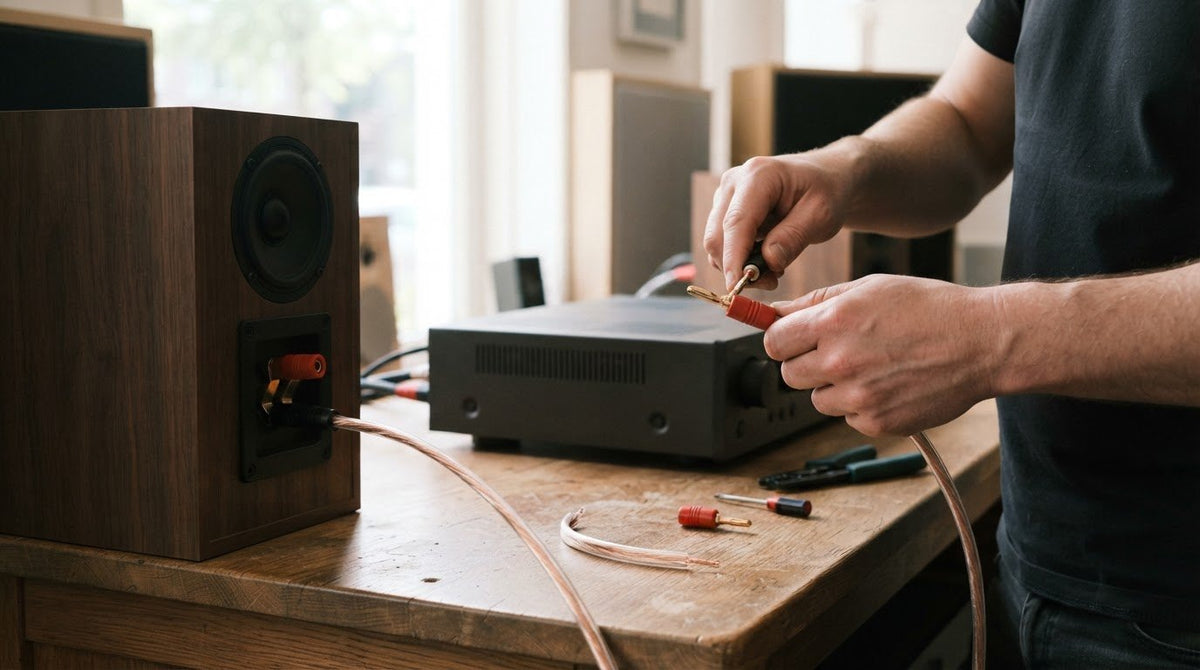
What determines whether a banana plug fits well: the cable, the connection or both? A banana plug is a connector with a 4 mm male connection that you attach to the end of a speaker cable. When choosing cables and banana plugs, pay attention to the connection to the cable and to the connections of your amplifier and speaker.
That sounds simple, but the way you attach the plug to the cable makes a difference. Some banana plugs have a screw connection; others are intended for soldering. The right choice will help you connect the cable securely and build your installation neatly.
In this article you can read what a banana plug does and how you determine which type suits your cables and audio equipment. You will discover what to pay attention to when making the connection, when banana plugs are useful and how to choose between a screw and solder connection. This way you choose a connection that suits your speakers and amplifier.
Key points
- Check which type of connections your amplifier and speakers have. Small spring terminals are not suitable for banana plugs.
- Choose a screw or solder connection that suits how you want to secure and mount the cable.
- Match the cable cross-section to the connection and the length of the cable route; a thicker cable does not automatically fit better.
- Determine how many plugs you need based on the connection: single-wire, bi-wiring or bi-amping.
- Pay attention to the plus and minus indications and keep the cables connected at both ends in the same way.
Compatibility with amplifiers, receivers and speakers
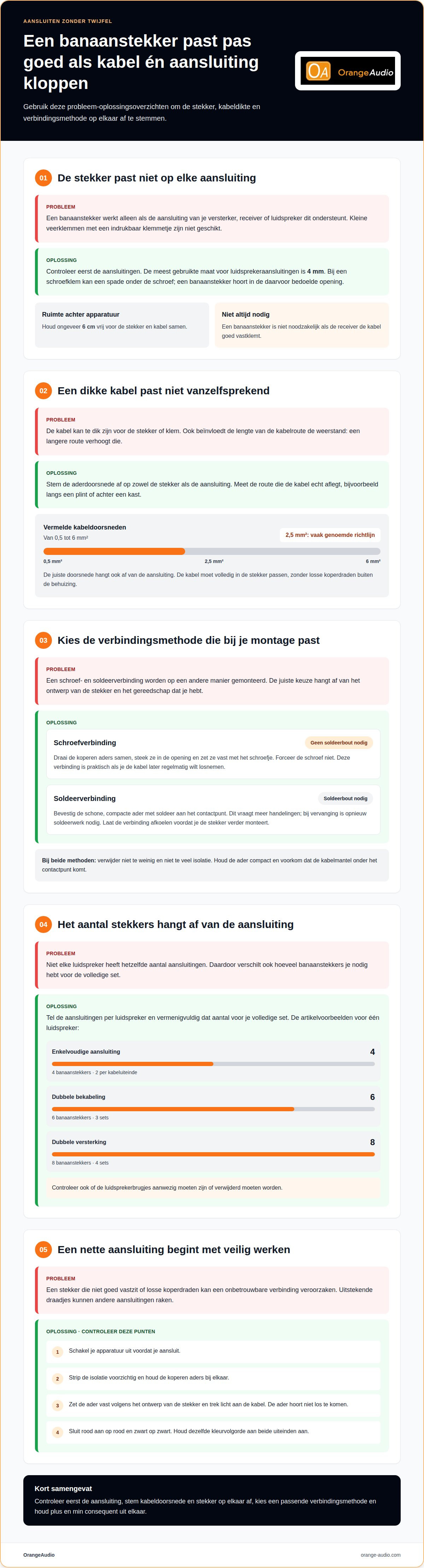
A banana plug only fits if the connection supports it. The most common size for speaker connections is 4 mm. Therefore, first check the connections on your amplifier, receiver and speakers. Small spring clamps with a push-in clamp are not suitable. With a screw clamp, a spade can be placed just under the screw. A loose speaker cable can also be attached directly, if the connection is suitable for this.
What safety risks are there when connecting banana plugs? A plug that does not fit properly or loose copper wires can cause an unreliable connection. Turn off your equipment and prevent protruding wires from making contact with other connections.
A banana plug is useful if a thick or stiff cable is difficult to fit into the connection. The plug also makes disconnecting cables practical. It is not necessary if the receiver clamps the cable properly. When mounting, the plug goes into the speaker terminal. Check that the size fits and the plug is secure. Also count on space behind the equipment: plug and cable together require approximately 6 cm.
Match the number of plugs with the connections of your speakers. Count the connections per speaker and multiply that number for your entire set. For a single-wire connection you need four banana plugs for one speaker, two per cable end. Bi-wiring requires six plugs, or three sets. With bi-amping there are eight plugs, or four sets. Also check whether the speaker bridges are present or need to be removed. The connection method determines how many cables and plugs you need.
Note the conductor cross-section of the speaker cable, measured in mm². The cable variants listed range from 0.5 to 6 mm². Choose a cross-section that fits both the plug and the clamp. A cable with a cross-section of 2.5 mm² is an often mentioned guideline, but the right choice also depends on the connection. The cable must fit completely into the plug, with no loose copper wires outside the housing.
Finish each cable end using the same steps. Carefully strip the insulation and keep the copper wires together. Insert the wire into the banana plug and tighten it according to the design. Then pull lightly on the cable: the core should not come loose. Connect Red to Red and black to black. Follow the same color sequence with the speaker. This keeps the connection clear and reduces the risk of mix-ups.
With a receiver with screw terminals, you can use banana plugs, spades or bare wire. Slide a spade under the screw clamp; insert a banana plug into the appropriate opening. Do not use a banana plug with small spring terminals. First compare the shape of the connection with that of the plug. This prevents a cable from not connecting properly despite the correct plug.
Banana plugs with solder or screw connections
The connection between cable and plug determines how you mount the cable. A banana plug has a male connection of 4 mm and can have a screw connection. The cable core is usually screwed or pressed onto the end of the plug. In other versions the core is soldered. Choose the method that suits your tools and the construction of the plug.
With a screw connection, you secure the cable with a screw in the plug. This makes installation clear, without the need for a soldering iron. Carefully strip the cable and twist the copper wires together. Slide the vein into the intended opening. Tighten the screw, but do not force it. Then check whether the wire stays in place when you lightly pull on the cable.
A soldered connection requires a soldering iron and a steady hand. You attach the cable core to the contact point with solder. Make sure the vein is clean and compact before you start. Hold the soldering iron near the contact point and prevent loose wires from sticking out. Allow the connection to cool before further mounting the plug. Soldering requires more steps than screwing, but makes the cable connection part of the contact point.
Prepare both types of connection in the same way. Determine how much insulation you need to remove based on the plug opening. Too little bare copper can prevent contact with the connection; too much can protrude beyond the housing. Keep the plus and minus cables apart and follow the color markings. Always connect Red and black in the same way. This way, even with multiple speakers, you can immediately see which cable belongs to which connection.
- Screw connection: suitable if you want to attach the core directly to the plug.
- Solder connection: requires a soldering iron and careful mounting at the contact point.
- Check: After installation, pull the cable lightly and check for protruding wires.
Compare the conductor cross-section with the space in the plug before installation. A thick cable cannot naturally fit into every connector. Also check that the cable sheath does not end up under the contact point. For cables that you regularly disconnect, a screw connection is practical to disassemble. A soldered connection requires new soldering when replaced. View the cables and plugs to choose a connection that suits your cable.
Suitable cable thickness and conductor surface
The cable cross-section affects the electrical resistance of a speaker cable. For the same material and length, a cable with a larger core cross-section has less resistance. A longer cable route increases resistance. Therefore, do not just measure the distance across the floor, but follow the route that the cable actually takes, for example along a skirting board or behind a cupboard.
Measure the entire route between amplifier and speaker, including bends and detours around furniture. Measure both speaker cables separately, as the routes are not always the same length. Then choose a cable cross-section that suits the distance and connections of your equipment. The route length is an important factor, but the available space at the connections also limits your choice.
A larger cross-section is not always the most convenient solution. A thick cable can be difficult to run along a skirting board or disappear behind a piece of furniture. Therefore, take into account the way you lay the cable. Does it have to go through a narrow opening, along a sharp corner or under a cable duct? Choose a size that fits the route, without forcing or kinking the cable.
When determining the cable length, take mounting into account. A cable that runs tightly between two connections is constantly under tension. Therefore, leave enough space for a relaxed bend at the amplifier and speaker. Work out the route first and then cut the cable to size. This way you prevent a measurement error from resulting in a cable that is too short.
- Follow the real route, including bends and detours.
- Measure the left and right routes separately.
- Take passages and cable ducts into account.
- Avoid sharp kinks and pulling forces at the connections.
The shape of the cable also plays a role. along. A stiff cable keeps its shape, but requires more space around bends. A more flexible cable is easier to guide along furniture. Check that the outer casing is suitable for the route and is not compressed by a door or furniture leg. This way the cable stays neatly and does not unnecessarily burden the connection.
Technical properties and material
Material and size tell you different things about a banana plug. The contact material indicates where the current conduction takes place; the size determines the fit. Assess these properties separately: the metal of the contact does not automatically indicate whether the plug fits your equipment.
Types of cables and banana plugs
A banana plug has a metal contact. Therefore, check the contact itself and the product specifications. The plug can also be Red . Color helps with recognition, but does not replace the technical data. Use that information to distinguish the plug from other connectors.
The cable and plug each have their own specifications. Cable data describes, among other things, the conductor cross-section; plug information concerns the contact and connection. Read both before combining parts. This way you avoid relying solely on color or appearance. For example, a metal contact and a red housing do not indicate which cable size fits into the connector.
Banana plug sizes
Banana plugs are not universal: sizes and designs differ. Compare the specified size with the connection of your equipment and also view the space around the terminal. This way you not only check whether the contact fits, but also whether you can practically place the plug.
Pay close attention to what exactly is measured in the size data. The contact size is slightly different from the space for the cable core. The outside of a plug can also be wider than the metal part. Therefore, compare the technical data of the connector with that of the connection and the cable. One size alone does not prove all are compatible.
Color can help tell parts apart during assembly. For example, a red plug is easier to recognize next to a different colored plug. Use color only as a visual marker, not as size or material information. Check these properties in the individual specifications.
Choose based on three pieces of information: the contact material, the size of the connection and the space for the cable. Check each point separately. This prevents a plug from appearing suitable, but not matching the technical dimensions of your equipment when mounted.
When assessing the cable and plug, the conductor cross-section is a separate check in addition to the size of the contact. Two twisted cores of 2.5 mm² each have a combined copper surface of 5 mm² and fit into the RU connected banana plug. This data helps to determine whether the combination of conductors and connector is suitable; they do not replace checking the connection to the equipment. So look at the specified cable construction and the plug design as separate properties. A larger total copper surface in itself says nothing about the fit of the contact.
Current value and cable size are also useful data when comparing versions. The banana to crocodile cables carry a current of 15A and are sized AWG 16. Consider both values when comparing a cable to an application, without confusing them with the banana connector dimensions. Equipment with 4mm banana connections is often designed according to safety guidelines such as IEC 61010 for measuring and laboratory equipment. This designation provides context for the type of equipment, but always check the size and specifications of the chosen cable and plug. This way, contact, conductor cross-section and current value remain separate points in your assessment.
What types of cables and banana plugs are there?
Distinguish between the cable that carries the audio signal and the connection at the end. For speakers, use speaker cable; you choose the connector based on the terminal and the desired mounting method. So treat cable type and plug shape as separate choices. First look at the connections of your equipment and then determine which combination is practical.
With connectors, the choice mainly depends on the connection. A banana plug is a mono connector type: each connector forms one contact. According to a mentioned comparison, spades have more contact surface, but do not fit on every connection. The terminal therefore determines which connector is suitable. A larger contact surface does not help if the connector does not fit in or on the connection.
The cable route can play a role in your cable choice. Take into account the distance between the devices, the route past furniture and the space behind the connections. A fixed installation requires a different practical approach than cables that you regularly remove or move. Therefore, first map out how you want to set up the equipment and route the cables.
Use this short selection sequence:
- Note which connections your amplifier and speakers use.
- Determine how you want to run the cables through the room.
- Choose the connector shape based on the terminal.
- Then compare the cable and plug on their technical data.
The mounting method also differs. Some banana plugs have a screw connection; others are intended for soldering. Choose based on the installation you can perform and the cable you use. Then check whether the entire combination is suitable for the connection. Do not just assess the individual part, but the connection as a whole.
A suitable choice helps keep your installation clear. Keep left and right recognizable and give the cables sufficient space near the equipment. This makes it easier to find a connection later or move a component without confusion. For an extensive setup, you can make a note of which cable runs to which speaker, or view useful accessories for your home via baseus-accessories.com to neatly organize all your cables.
When putting together your installation, you can include the cables and plugs in your choice of other connection materials. Compare the cable and connector details with the setup you have created. This way you choose parts that fit together, instead of just relying on the appearance of one plug.
According to a forum participant, banana plugs are not necessary if the cable can be properly secured to the receiver. They can be useful for stiff or thick cables that do not fit properly in the receiver.
One speaker with bi-wiring requires 6 banana plugs, or three sets. One speaker with bi-amping requires 8 banana plugs, or four sets.
OrangeAudio
OrangeAudio helps you see the connections of your audio equipment in context. Match your cable choice to the amplifier and speakers you use. Pay attention to the type of terminal, the space for the cable and the way in which you secure the core. This way you determine which connection suits your setup.
When choosing new speakers, also take the connections into account. OrangeAudio offers bookshelf speakers, floor standing speakers, active speakers and built-in speakers. See how they connect to your existing equipment and suit your space and listening needs. Do you want advice about cables and banana plugs? Contact OrangeAudio.
Prepare your installation for the next step
A suitable connection is not only important for today. Also think about possible adjustments to your audio system. New speakers, a different setup or additional equipment may require different cable lengths and connections. Therefore, choose with your entire installation in mind, not just one cable end.
Take the connections into account when comparing speakers. OrangeAudio offers bookshelf speakers, floorstanding speakers and active speakers. The combination with your amplifier determines which connection practically suits your space and listening needs. This gives cables and banana plugs a logical place in your audio system.
Discover the possibilities and see which connection materials suit your setup. View cables and plugs for your audio equipment. Choose calmly, with an eye for a well-maintained installation that grows with your listening pleasure.
Frequently asked questions about banana plugs
What is a banana plug?
A banana plug is a connector with which you connect a speaker cable to a suitable connection. The plug usually has a 4mm male connection and is attached to the cable end. You then plug it into the appropriate speaker terminal. You use a separate plug for each cable end. Check whether the connection is intended for this purpose; for example, a banana plug does not fit in a small spring terminal.
Which banana plugs fit which speaker cables?
The correct plug depends on the diameter of the connection and the space for the cable core. Therefore, check the size of the terminal and the cable opening of the connector. A plug with a screw connection secures the conductor differently than a soldered version. For example, a thick cable does not fit into every plug opening. Also check whether you install the cable core single or twisted together.
Which cable thickness is suitable for banana plugs and speakers?
There is not one cable thickness that fits every speaker. The cable variants listed range from 0.5 to 6 mm²; the chosen plug must be able to receive the conductor and hold it firmly. If you have a long cable route, also take the distance between amplifier and speaker into account. Therefore, assess the cable cross-section, plug opening and connection terminal together. A thicker one is not automatically suitable for every connector.
How do you install banana plugs on a speaker cable?
Install the plug while the audio equipment is switched off. Carefully strip the cable sheath so that only the necessary part of the core is exposed. Twist loose copper wires together and place the wire in the opening. Secure it with the screw or solder it according to the plug type. Then check that no wires are sticking out and that the cable is firmly attached. Repeat this for each cable end.
Which banana plugs are suitable for amplifiers and speakers in the Netherlands?
The suitable plug is determined by the connections of your devices, not by the country in which you use them. A 4mm banana plug is commonly used for speaker connections, but will only fit terminals designed for that purpose. Check the connections on both amplifier and speaker. Small compressible spring clamps are not suitable; Other connection types can also be used with screw terminals.