
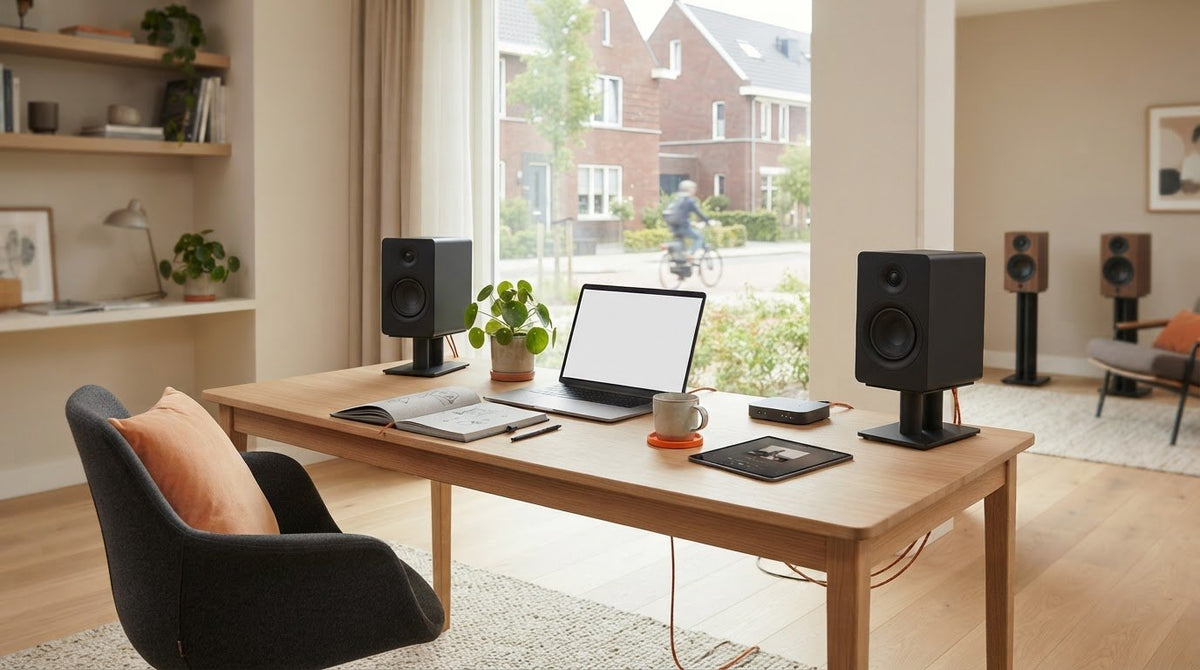
The cost of a background music system for your home office depends on the setup you need. A compact solution may suffice for one workplace, while a more extensive system requires different equipment. Therefore, first decide what you want to hear every day and how you want to use the music.
You do not have to record all the choices right away. Start with your wishes for the workspace: do you mainly want a pleasant atmosphere during concentrated work, or should the installation also be suitable for conversations and consultations? Also think about how visible the equipment should be and how easy you want to adjust the music.
In this guide you can read which equipment suits different home offices, how to manage playlists and volume and which choices affect the total costs. This way you can make targeted comparisons and determine what adds value for your workplace before you put together a system.
Key points
- Choose speakers and amplification based on the space, the desired placement and how you want to control music.
- Tune your playlists to work and adjust the volume so that music remains pleasant without dominating conversations.
- Discover when to operate via a wall panel, tablet or telephone is useful for your workplace.
- See how quiet music in an office or general area can contribute to a pleasant working environment.
- Compare visible speakers with built-in speakers and discover which setup suits your home office best.
Playback and control equipment controlling music
Start with three choices: music source, connection and control. Then determine whether one workspace or multiple spaces need sound.
Wireless and wired systems
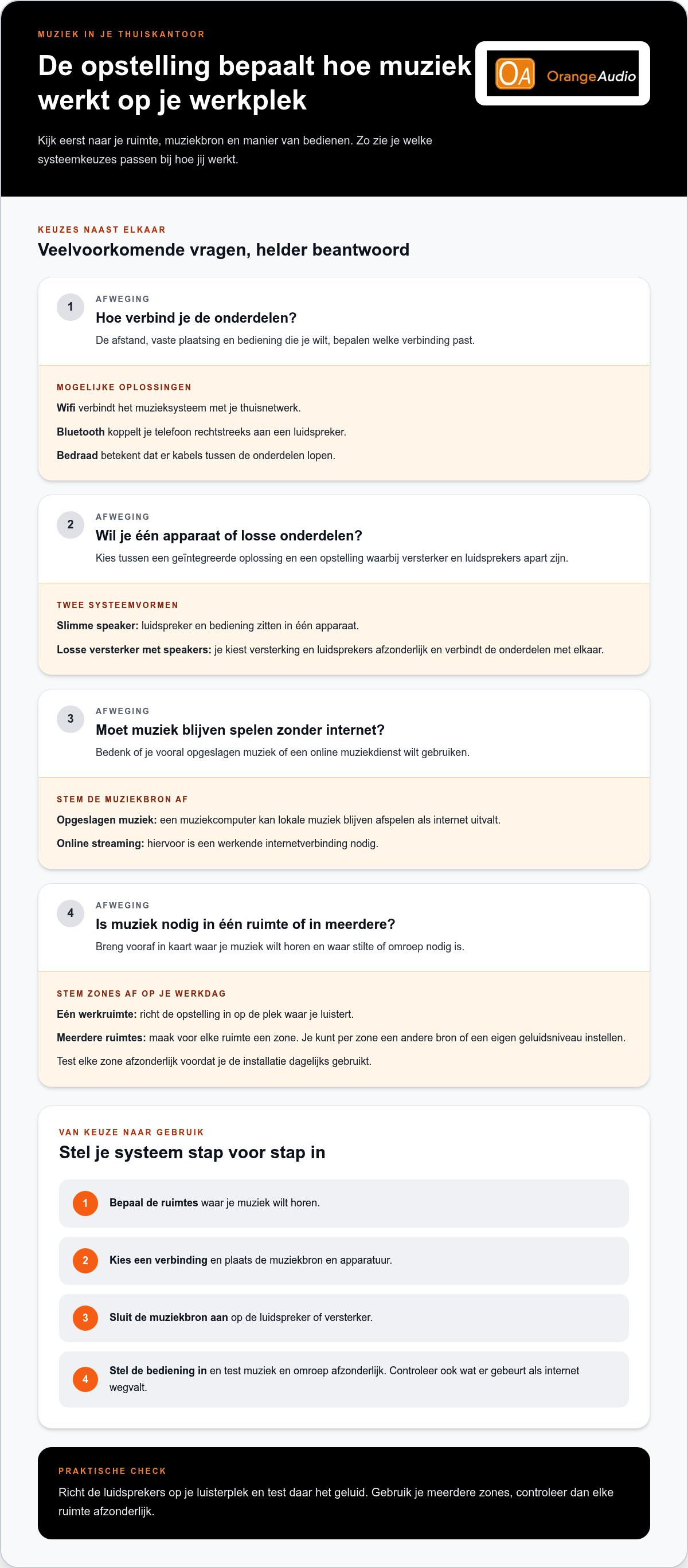
Wifi connects a music system to your home network. Bluetooth links a phone directly to a speaker. In a wired setup, cables run between the components. Choose based on the distance, fixed placement and control you want.
A smart speaker combines the speaker and control in one device. With a separate amplifier with speakers these are separate parts. This way you choose the amplification and speakers separately, but you have to connect the parts together.
A music computer can continue to play stored music when the internet goes out. A working connection is required for online streaming. Therefore, decide whether you mainly want to use locally stored files or an online music service. That choice determines which music source you connect.
Music in different work spaces
Match your choice of music to your work. Instrumental music can be pleasant during concentrated work; during consultations, silence is sometimes more practical. Also consider who hears the music. A playlist for one home worker does not have to provide the same atmosphere as music for a shared workspace.
A warehouse or production space has different requirements than a home office. 100-volt systems and industrially suitable loudspeakers are used for distribution over greater distances. When music and broadcasting go together, speech must remain clearly intelligible. Therefore, also test a broadcast message while music is playing.
Do you want to add a zone to a DANTE-based installation? Then a cable is pulled to the central matrix and the software is configured. Map in advance where employees hear music and where broadcasting is needed. This way, the distribution fits in with the daily activities.
Installation and control
When installing a home office system, start by choosing the music source and the location of the equipment. Then connect the source to the speaker or amplifier, according to the equipment connections. Point the speakers at the listening position and test whether the music sounds good there.
If you want to use multiple rooms, create a zone for each room. For example, you can play music in the office and choose a different source in another room. Set the controls so that you can select the correct zone. Test each zone separately before using the installation daily.
Work step by step: determine the rooms, choose a connection and connect the music source. Then set the controls and test music and broadcasting separately. Also check what happens if the internet connection is lost. This way you know which sources continue to play locally and which require an online connection.
Import playlists and control volume remotely
First create playlists that suit the different times of your working day. Consider quiet background music for writing tasks and a different selection for breaks. How you add music depends on the source. You often choose a list, favorite or channel in the accompanying app and link it to the desired room. Give your lists recognizable names so that you can quickly find the right one while working.
Check how your system handles playlists before use. Some resources provide access to lists in their own app; others work with music files that you select yourself. See if you can find saved choices and if a playlist restarts after you switch sources. This way you don't have to search again and again during a working day.
Adjust the volume from your workplace. Turn the music down low and increase the level until you hear it clearly without it drowning out your thoughts. Then listen during a phone call or meeting. If you have to raise your voice, turn the music down. Dir speakers not on a shared wall and check in the adjacent room to see if you can hear the music there.
With a multi-zone amplifier, each room can have its own sound level. This is useful if you want to hear music at your desk, but need silence in an adjacent room. You can use a different source or your own schedule per zone. This way, the music continues to play in one room while you have a conversation elsewhere.
Make operation simple. Choose a place that you can easily reach while working, for example on your phone or a wall panel. Test in advance which action directly adjusts the volume. This way you avoid having to search through menus during a conversation. If necessary, make a note of your most pleasant setting, so that you can quickly return to an appropriate level after a change.
Limit noise pollution for neighbors by starting with a low volume and listening outside the office. Move the speakers if the sound mainly goes to a shared wall. Also adjust the bass if it sounds clearly through walls or floors. Repeat the listening test at the volume you normally use.
For multiple rooms, multi-room audio is an option to adjust sources and volume per zone. First determine which rooms really need music. Then choose the desired control and test the playlists individually. This way you can tailor the operation to your working day, without giving every room the same music or volume.
Operation via touch panel, tablet or telephone
A wall panel, tablet or telephone can control the music volume and the selected source. Choose the control that you can quickly reach during your working day.
Operation via wall panel or app
A wall panel offers a fixed place to operate the installation. For example, you can adjust the volume or choose a different music source. This is useful if your phone is elsewhere or you prefer not to use your business device.
You can operate a central app from a tablet or phone. Depending on the system, you can start and pause music, and adjust the volume. Check whether the app offers the features you need, such as room-by-room control. For example, place the tablet on your desk for direct access while working.
With central control, you don't have to adjust each speaker individually. You choose the workspace and change the sound there, while music can continue in a separate room. This way you can control the installation from one overview instead of with different controls.
App control, timers and multi-room
Which systems offer control via an app, timer and multi-room? Choose a system whose app controls zones individually and has a timer function. With multi-room you send music to multiple rooms. The available functions depend on the chosen equipment and app.
For example, set a timer to start or stop music at a chosen time. Use such a schedule for your fixed start and end time. Then check whether the correct room and music source are set. A schedule is especially useful if the operation remains clear.
With multi-room you can use a different source, its own volume and its own schedule per zone. Think of music in your home office and silence in the next room. See how multi-room audio fits into multi-room control.
Some systems also offer gesture control. This can be useful if you cannot directly access a panel or telephone. It is an additional form of control, not a replacement for a clear app or wall control. Therefore, check whether the function suits your workplace and daily use.
Before you choose, make a short list of desired functions: choosing a source, adjusting the volume, controlling zones and setting timers. Test each function from your workplace during setup. For example, start a playlist, turn down the volume and then turn off one zone. This way you immediately notice whether the controls work logically.
Background music for offices and common areas
In an office, music should be pleasantly present, without demanding attention. Choose quiet, evenly spaced background music to make ambient noise less distracting. Consider soft instrumental music during administrative work. This way, employees can enjoy it without missing conversations or phone calls.
The right music depends on the work and the people in the room. A quiet playlist can suit focused work; during a joint break the choice may be more lively. According to the market research provided, 80% of employees enjoy working with music. That doesn't mean that everyone likes the same music or the same volume.
Adjust the setup to the room. Position speakers so that the sound is evenly distributed, rather than turning up one speaker loudly. Test the music from different workstations and also listen at the entrance. If you hardly hear music in one place and you have to drown out conversations in another, adjust the placement or volume.
A central radio can make employees without earphones more approachable to colleagues. This can fit in with an open communication culture, for example in a shared workspace. In a home office, the emphasis is often on concentration. Choose a playlist that is not very distracting and turn the music down as soon as you start a video call.
Make agreements in advance about the choice of music and operation. For example, agree on who will choose the playlist, how colleagues can request a song and when the music will turn off. In a shared workspace, such a simple agreement prevents discussion about the music source. In a home office, you can use the same approach for work hours and breaks.
Business music requires permission. Arrange public playback rights separately from your music subscription. According to BumaStemra, you must first request an agreement for music via a digital subscription. A subscription to a music service does not automatically give permission to play music for business purposes. Take this into account when choosing your music source.
Keep common areas separate from places where silence is needed. A reception room can have calm music, while a meeting room remains quiet. With zones you can set your own volume per room or switch off the music. This means that not every room has to have the same atmosphere or sound setting. Start with a listening test per room and adjust the distribution to the use.
A central radio can be a conscious choice if mutual contact is important: employees without earphones are more approachable to colleagues, which can contribute to an open communication culture. Discuss with the team which music suits the working day and how the choice is made. This makes it clear that the radio is a shared facility. Stick to the agreements regarding music choice and volume, so that the music supports daily work.
What types of background music systems are suitable for a home office?
For one workspace, a simple setup may be sufficient, such as A pair ceiling or surface-mounted speakers with a simple amplifier. The best choice depends on the room, desired placement and how much equipment you want to see. First map your workplace and listening position. This way you determine where sound is needed without purchasing unnecessary equipment.
A separate speaker requires little space and can fit a compact desk. If you want to hear the sound from both sides, choose A pair speakers and place them to the left and right of your workplace. An amplifier drives passive speakers; active speakers have built-in amplification. That difference determines which parts you need. Also take into account the power supply and any cables.
Surface speakers remain visible and can be placed on a wall or ceiling. They are suitable if you do not want to install speakers in walls or ceilings. Built-in speakers disappear into a ceiling or wall and suit a quiet interior. Before making your choice, look at the material and layout of the room. A sloping ceiling or fixed cupboard can affect the placement.
For an office with multiple workspaces, a system with separate zones may be suitable, for example for a workroom next to a reception area. This way you can control the music per room, instead of using the same sound level everywhere. If you only work in one room, a multi-room system may add unnecessary controls. Therefore, let your choice depend on the number of rooms that really need music.
Use these steps to choose the setup:
- Determine the listening position. Note where you usually work and where conversations take place.
- Choose the placement. Compare visible surface-mounted speakers with integrated built-in speakers.
- Decide on amplification. Choose active speakers or combine passive models with an amplifier.
- Map rooms. Only include extra zones if other rooms also need music.
- Test the distribution. Play music from your desk and also listen at the edges of the room.
A good arrangement does not have to be complicated. For an office, A pair speakers with a simple amplifier may suffice. A larger space or multiple rooms require more attention to placement and operation. Compare the options for visibility, required equipment and ease of use. This way you choose a system that suits your home office, without choosing features you don't use.
OrangeAudio: Bookshelf Speakers
OrangeAudio helps you choose a suitable speaker setup for your home office. Bookshelf speakers are practical if you want to place the speakers on a desk, cupboard or stand. They suit a fixed listening position and can be combined with an amplifier.
Do you want as little visible equipment as possible? Then view built-in speakers. For a larger space you can use floor standing speakers consider. Active speakers are an alternative if you want the amplification in the speaker itself. The right choice depends on the room, the desired placement and how you want to control the music.
Discover the different speaker types and compare which solution suits your workplace. Please feel free to contact OrangeAudio or visit orange-audio.com.
Give your workplace a sound that suits you
See the choice of a background music system for your home office as part of your workplace, not as a separate addition. Consider what atmosphere you like during a normal working day and how visible the equipment should be. This way you have a clear starting point for a system that suits your space and way of working.
OrangeAudio offers Bookshelf Speakers, Floor-standing Speakers and Active speakers. This allows you to explore different setups, from speakers on a piece of furniture to a solution with built-in amplification. Compare them on placement and operation and choose what suits your daily use.
Want to discuss your needs and discover which speakers suit your home office? Contact OrangeAudio. With a clear starting point, it will be easier to start your working day with pleasure.
Frequently asked questions
What does it cost?
The costs depend on the equipment and the desired setup. A system with speakers, amplification and controls per room requires different components than one separate speaker. Cabling, placement and the number of zones also influence the choice. Therefore, first determine which rooms need music and how you want to operate them. This way you can compare solutions based on the same wishes, without overlooking necessary parts.
Can I adjust the volume remotely?
Yes, this is possible with a system that supports operation via an app or wall panel. For example, you can lower the volume from your desk before starting a video call. With multiple zones, you can adjust the sound per room, without changing other rooms. When making your choice, check whether the controls work with the music source and speakers you want to use.
What should an office sound system be able to do?
An installation should make music sound clear in your workplace and make it easy to adjust the volume. Also consider whether you use one room or want to hear music in multiple rooms. In a home office, a separate zone can be useful if you sometimes meet in an adjacent room. Choose a music source that suits your use and make sure you can quickly pause or turn down the music.
Does the music computer also work without internet?
A music computer can continue to play music if the internet connection is lost, provided the music is available locally. This is useful, for example, if you want to continue playing stored music during a temporary outage. Music streamed directly via an online service is dependent on the connection. Therefore, decide in advance whether you want to use a local music collection, online playlists or both.
How much does a background music system cost for a home office?
The cost of a background music system for your home office depends on the speakers, amplification and controls you choose. A simple single workspace setup differs from a system with separate zones or additional cabling. First decide where you want to hear music and how you want to control the volume. Then compare complete setups so that all necessary components are visible.
Which speakers are suitable for background music in a small office?
For a small office, compact surface-mounted speakers or ceiling speakers are possible choices. Surface-mounted models remain visible and can be placed on a wall or ceiling. Ceiling speakers are less visible, if the room is suitable for them. Also pay attention to the position of your desk: an even placement can be better than one speaker playing loudly from one side.
How many speakers do I need for a home office?
That mainly depends on the shape of the room and where you work. For a compact workplace, one listening point may be sufficient; A pair speakers can emit the sound from both sides. Also check whether a bookcase, desk or door shields the sound. Start at your listening position and then determine how many speakers are needed for even distribution.