

A pleasant workplace is not just about a good screen and a comfortable chair. Sound also counts: music can make your working day more pleasant and clear speech is pleasant during conversations and online meetings. Active speakers for your desk are a practical way to provide your computer desk with its own sound setup. The right choice depends on the space, your listening habits and the devices you use.
Maybe you are looking for a compact set that takes up little space, or speakers that are also suitable for enjoying music after work. Consider in advance what is most important to you: a tidy setup, versatile use or consciously listening to music. This assessment allows you to compare models in a more targeted manner.
In this article you can read how to assess the options and tailor your choice to your situation. You will discover what to pay attention to when using, size and power, how to place a stereo setup around your monitor and which connections suit your devices. This way you can more specifically determine which speakers suits your desk and daily listening moments.
Key points
- Choose active speakers if you want a built-in amplifier and do not need a separate amplifier.
- Match the connection to your device: models can, for example, have Bluetooth, WiFi, USB or an optical input
- Make your choice depend on the space and use, from compact listening at your desk to music in the living room.
- Place the speakers left and right of your monitor for a pleasant stereo setup.
- Discover active speakers and bookshelf speakers at OrangeAudio for a setup that suits your listening position fits.
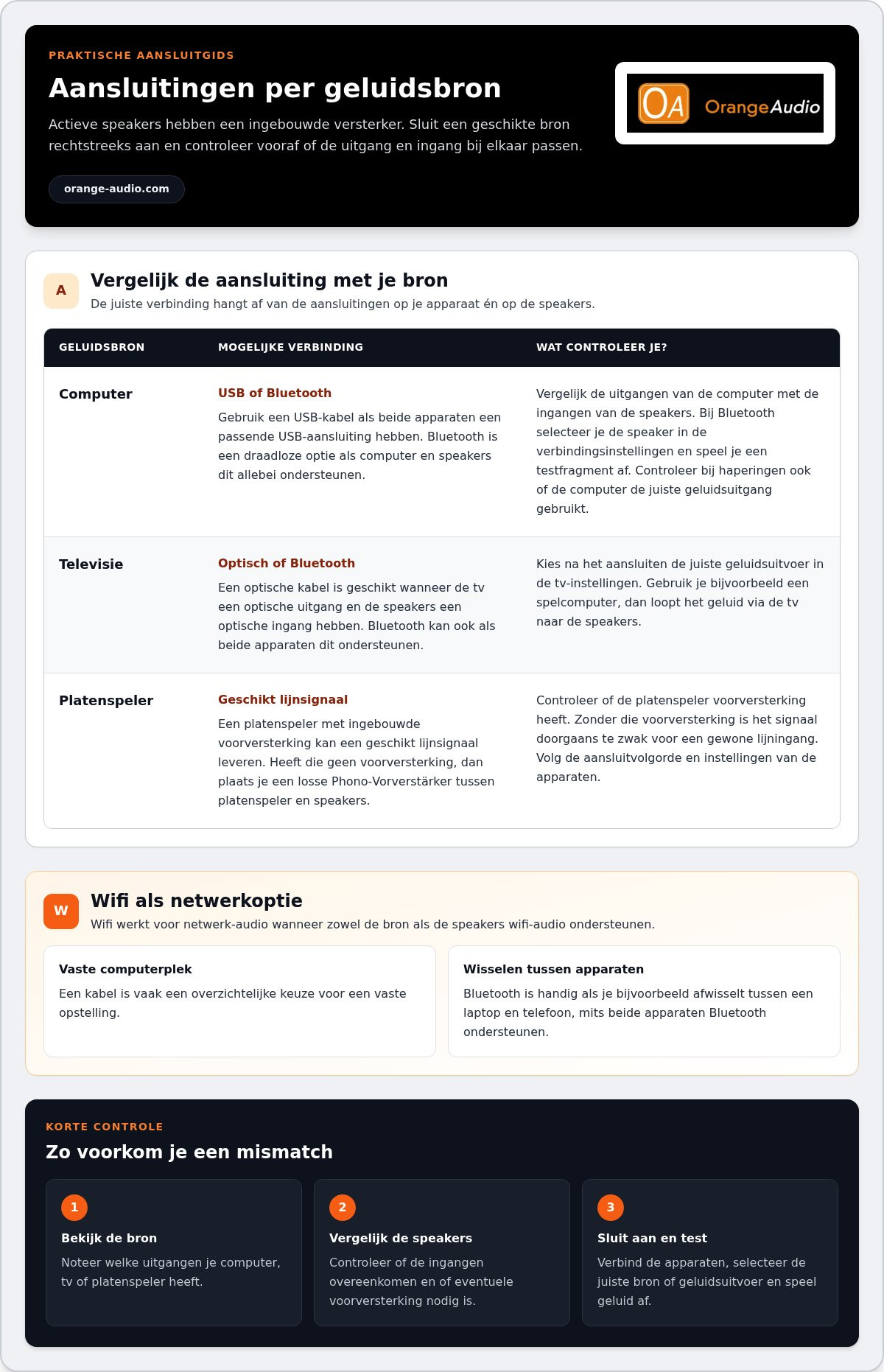
Connect to computer, television and record player
Active speakers for your desk have a built-in amplifier. So you connect a suitable sound source directly, without a separate amplifier in between. The connections differ per model: think of Bluetooth, WiFi, USB and optical inputs. Therefore, first check which output your computer, television or record player has and which input the speakers support.
If you use a computer, choose a connection that both devices support. If the speaker has a USB input and the computer has a suitable USB connection, connect them with a USB cable. Bluetooth is a wireless option if both devices support it. Turn on Bluetooth, select the speaker from the connection settings and play a test clip. Hiccups? Also check whether the computer uses the correct sound output.
For a television, an optical cable can be useful if the TV has an optical output and the speakers an optical input. Connect both devices and then choose the correct sound output in the TV settings. For example, if you watch a movie on a game console, the sound will be sent via the TV to the speakers. Bluetooth is also possible, if both devices support this. A wired connection keeps the connection simple.
With a record player, the output signal is important. A record player with a built-in Phonopreamplifier can provide a suitable line signal. If the turntable does not have this pre-amplification, you will need a separate Phonopreamplifier between the turntable and the speakers. Without pre-amplification, the signal is usually too weak for a regular line input. Follow the connection sequence and settings associated with the turntable and preamplifier.
- Computer: connect USB if both devices have it, or pair via Bluetooth.
- Television: use optical when TV output and speakerinput match.
- Turntable: connect a suitable line signal; add pre-amplification if the turntable does not have it.
Wi-Fi is an option on models that support networkaudio . For example, music can be sent to the speaker via the network, but for this both the source and the speakers must support WiFi-audio . For a fixed computer location, a cable is often clear. Bluetooth is useful if you regularly switch between, for example, a laptop and telephone.
Do a quick check before connecting: write down the outputs of your source, compare them with the inputs of the speakers and choose a suitable connection. Connect the cables, select the correct source on the speakers and play sound. This way you avoid choosing an optical cable, USB cable or wireless connection that does not suit your computer, television or record player.
Why choose active speakers?
Thanks to the built-in amplifier, active speakers are suitable for a computer workplace, office or studio. Choose based on your daily use, the available space and the sound level you prefer.
Choice based on use
Start by asking what you use the speakers for most often. For video calls and background music at a desk, a compact model for a small space is often a good fit. If you also listen carefully to music, pay attention to a reproduction in which voices and instruments sound clear. In a studio, a neutral sound can be important so that you hear details clearly.
Make a short list of your most important sources and listening moments. Think of a computer for work, music during breaks and movies on a connected screen. This way you can see which connections and functions you really need. Bluetooth is useful when switching between computer and phone; for a fixed installation, a wired connection may be clearer.
Weigh size and power
First measure the spot next to your monitor. Make a note of how much space is left and check that the speakers are not in the way of the keyboard or screen. 8 inch and 10 inch models are compact and suitable for speech and smaller spaces. Bigger is not automatically better at a desk: the room, listening distance and desired volume determine what works well.
Always assess the power in relation to the use. A higher specified power does not in itself tell you how a speaker sounds in your room. Also pay attention to the housing, controls and listening distance. For a small workplace, a model that sounds clear at a modest volume is often more practical than speakers which are mainly tuned to high volumes.
The space also determines how you weigh size and use against each other. Compare the dimensions of the speakers with the free space on your desk and think about where you usually sit. If you mainly listen to speech, intelligibility is important. If you also use the speakers for music, pay attention to the connection between vocals, bass and instruments. This way you choose based on your working day, not just a specification.
Use the following points to specifically compare models:
- Goal: determine whether speech, music or studio work is paramount.
- Space: measure the area next to your monitor and take your listening distance.
- Size: compare compact 8 or 10 inch models with the available space.
- Power: rate the specification together with usage, distance and desired listening strength.
- Features: choose connections that suit your computer and other everyday sources.
By listing these points in advance, you prevent one striking specification from being decisive. A compact speaker can fit on a small desk, while a larger space has different requirements. Match size, power and use. Here's how to find active speakers for your desk that suits how you work and listen.
Compact PCspeakers and larger living room speakers
A speaker size that works comfortably next to a computer screen may look different in a living room. Therefore, do not only look at the outside dimensions, but also at the space, listening distance and use. Active models of 8 and 10 inches are compact and suitable for speech and smaller spaces. Larger sizes are intended for applications with more space and reach.
For a PC workstation, 8- and 10-inch models are often a logical category to look at. They are more likely to fit next to a monitor and are suitable for speech in smaller spaces. First measure the available space on your desk and compare it with the dimensions of the housing. Also take into account the location of your screen, keyboard and other equipment. This way you prevent speakers from unnecessarily taking up your work surface.
If you mainly listen at your desk, take the short listening distance into account. This way you can listen to sound comfortably at a modest level. If you also use the speakers for music while working, listen to see whether voices and instruments sound good together. Think of a podcast during a task and a playlist during the break. That daily use will help you determine which size is suitable.
A larger model may be more practical for a living room, because you often sit further from the speakers. Active speakers from 12 inches are described as all-rounders for music and parties. They can therefore suit a space that requires more than a fixed computer spot. Just consider where you put them and how much free space is available around the speakers . The dimensions must suit the room and the furnishings.
15-inch models offer extra low and more reach for larger rooms and outdoor use. That size is therefore not automatically the best choice for an office or small living room. A larger speaker takes up more space and is especially suitable for an application with sufficient space. So don't choose based on size alone, but connect the size to the place where you listen and the volume you need.
Use these steps to compare compact PCspeakers and larger living room speakers:
- Measure the location: note the available space next to your monitor or in the living room.
- Decide listening distance: compare close listening at a desk with listening from a couch.
- Match size to use: look at 8 or 10 inches for smaller rooms, 12 inches for music and parties, and 15 inches for larger rooms or outdoor use.
- Consider the content: distinguish speech, background music and listening at higher volume.
A concrete example: for a small workplace with mainly video calls, you can first look at compact 8- or 10-inch speakers. If you also want to use the same set in a spacious living room, compare whether a larger size better suits the listening distance. This way you choose based on your space and listening moments, instead of just choosing the largest speaker.
Built-in amplifier and no separate amplifier required
An active speaker has an amplifier in the housing. This amplifies the audio signal so that the speaker can reproduce it. This means you don't need a separate amplifier for a computer setup. Connect a suitable sound source directly to the speakers and select the correct input. This saves you having a separate device on or under your desk.
With passive speakers, a separate amplifier sends the sound to the speakers. With active models, these functions are brought together: the amplifier is in the speaker. This makes the setup clear if, for example, you only want to hear computer sound. You do not need to place a separate amplifier between the computer and speakers .
Note the difference between amplification and connection. A built-in amplifier does not mean that every sound source will automatically fit. Before purchasing, please check which output your computer has and which input the speakers provide. For example, if your computer has USB and the speaker has a suitable USB input, you can use that connection. For a different connection you may need a suitable cable.
Operation also differs per model. Some speakers have a volume control on the housing; with others you control the volume via the computer or a remote control. Think about where you want to adjust the volume while you work. If there is an speaker behind your monitor, then operation via the computer may be more pleasant. If the controls are within reach, you can adjust the sound immediately.
A built-in amplifier also limits the number of devices in your workplace. This way you have space for a laptop stand or documents, for example. The built-in amplifier needs power; check how the chosen model is powered. Check where the socket is located and how you route the power cables along your desk. Plan both the signal cable and the power supply this way.
Use this check before choosing an active set:
- Source: determine whether your computer, phone or other device is supplying the sound.
- Input: compare the connections of the source and the speakers.
- Volume: choose where you want to adjust the sound during use.
- Power: determine where the speakers will be located and how the power cable will run.
For example, if you connect a computer to active speakers, the built-in amplifier will power the speakers . You do not need a separate amplifier, but you do need a suitable connection and power supply. This way you keep the setup simple and you don't forget the connection choice.
Stereo setup left and right of a monitor
Place one speaker left and one right of your monitor for stereo sound. This gives music a more spatial representation and you hear the difference between the channels. Start with both speakers an equal distance from your seat. A symmetrical setup helps prevent the sound from seeming to come more from one side.
First place the speakers next to the screen and sit in your usual spot. Then point them towards you, not towards the wall behind the monitor. Turn them up a bit and listen to a well-known song with vocals in the middle. If the voice remains central, then the balance between left and right is probably good.
Also pay attention to the height of the tweeters. Preferably place them at about ear height when you are sitting upright. If the speakers are placed low on the desk, use sturdy risers or suitable stands. This way you prevent the sound from seeming to come mainly from the desktop. Also check that the riser does not interfere with the screen or other equipment.
Allow sufficient space around each speaker . A speaker directly against a wall or in a corner may sound different than in a more open location. Gradually slide the speakers forward or to the side and compare the sound each time from your seat. Always change one position at a time. This way you can better hear which movement affects the stereo image and the sound.
Complete these steps in order:
- Create space: remove loose items from the areas to the left and right of your monitor.
- Distribute the speakers: place them on either side of the screen, at an equal distance from you seating position.
- Aim them: rotate both speakers to your listening position and play the same sample of music.
- Adjust: change one position at a time and listen again from your seat.
A wide monitor can leave little space. Put the speakers then a little further out, but keep them about the same distance from your listening position. If you use a second screen, place the speakers on the outsides of the screens. Make sure that a monitor does not partially shield speaker . Also check that the cables run along the stand without moving the speakers .
With a stereo setup, it is not only about left and right, but also about your permanent listening position. If you sometimes listen standing or from a different chair, the balance changes. Therefore, first adjust the placement to the place where you work most. Then compare a second place if necessary. This way you discover what the setup sounds like when you are not sitting directly in front of the screen.
Do you want to view different formats for such a setup? Then compare bookshelf speakers for a stereo setup with the space next to your monitor and your use.
OrangeAudio: Bookshelf Speakers
OrangeAudio offers different speaker types for different listening places. For a desk, you can look at active speakers. Bookshelf speakers are another option if you have enough space next to the screen. If you are looking for speakers for a more spacious listening environment, also compare floorstanding models.
Make your choice based on your space, the devices you want to use and how you usually listen. For example, consider whether the speakers mainly play during work or also at other times at home. This way you can determine more specifically which type suits your needs, without relying solely on appearance or size.
View the speakers from OrangeAudio and contact us to discuss your choice.
Choose speakers that grow with your workplace
Your listening position does not always have to remain the same. Maybe you mainly work behind a laptop now, but later you will also use a desktop computer or listen more often during a creative activity. Therefore, don't just choose what seems useful today. Also think about possible changes in your workplace and listening times. This way you choose a set that suits your daily routine, even if it changes.
Determine what role sound plays in your day. Do you mainly want a pleasant background during tasks, or is music a conscious moment of rest? Do you want to use the same setup for other devices later? These questions help you determine which qualities are really valuable to you. This way you assess active speakers for your desk based on your own use, not just on the basis of technical characteristics.
Take the time to compare your wishes with the available options. Bee OrangeAudio you can orientate yourself on audio for different listening locations and usage situations. Contact OrangeAudio to discuss your choice and take the next step with confidence.
Frequently asked questions about active desk speakers
Which connections are important for active desk speakers: USB, Bluetooth, RCA or 3.5 mm?
Choose a connection that supports both your sound source and the speaker supports. USB can provide a direct connection to a computer; Bluetooth connects wirelessly. RCA and 3.5mm are analog connections, useful when both devices have suitable outputs and inputs. Check the connections before choosing cables. For example, if you use a laptop without an RCA output, you will need another suitable output for that connection.
Which active speakers suit a small desk or a small room?
Choose compact speakers that fit next to your screen and leave enough space for your keyboard. 8 or 10 inch models are suitable for speech and smaller spaces. In addition to the size, also look at the depth of the housing, because that determines how much desk space is left. If your desk is in a corner or against a wall, take that placement into account when comparing and listening.
How do you choose the right size and power for desk speakers?
Adjust the size to the room and the power to your listening use. A higher power does not automatically mean that an speaker sounds better on your desk. Also pay attention to the distance from the speakers and the volume at which you usually listen. Only compare technical data if it is specified in the same way. If you listen mainly softly while working, judge models on clarity at that volume.
Which active speakers are suitable for music, gaming and working from home?
One suitable set can serve all these applications, as long as the connections match your computer or other source. Intelligible voices are important for working from home; With music you want to be able to follow instruments comfortably. During games, the placement of sound can help recognize direction. If you use one computer for work and relaxation, choose speakers that connect easily and sound pleasant with speech and music.
How do you optimally place and adjust active speakers on a desk?
Start at your regular listening position and place the left and right speakers symmetrically relative to your chair. Point them towards you and use a familiar piece of music to assess the balance. Then test a video call or game sound. Move a speaker a small distance each time if voices or sound effects seem to come from one side. This way you notice the effect of each adjustment without changing multiple factors at the same time.
What are the advantages and disadvantages of Bluetooth for active desk speakers?
Bluetooth prevents an extra signal cable on your desk and is useful when you switch between devices. For example, if you switch from computer to telephone, you must select the correct sound source. Delay between image and sound may be noticeable during games or video. A wired connection avoids that wireless step and can therefore be more convenient when timing is important. Compare the possibilities with your devices and daily use.
Do active desk speakers require a separate subwoofer ?
For dance, hip hop and house, an active subwoofer is worth considering. This can supplement the low tones, so that the speakers need to reproduce less bass.