

A more expensive cable is not automatically better. You can debunk the myth of expensive cables by looking at what your installation needs: the right connection, a suitable length and sufficient shielding for the environment. A cable must connect reliably; a higher price tag does not automatically mean that your music sounds better.
Yet it is understandable that you have doubts. Cables differ in material, finish and price, while their influence is difficult to assess without listening. Therefore, start with your use: which devices do you want to connect, what distance does the cable have to bridge and does it run past possible sources of interference? This way you make a practical choice, instead of being guided only by appearance or price.
In this article you can read which cable suits your situation and which properties really matter. You will also discover how to assess differences without assumptions: compare the same music on your own installation and pay attention to what you actually hear. A listening session in a showroom or at home can further clarify your choice, helping you decide with more confidence what suits your listening position.
Key Points
- Choose a cable based on the connection, the length required and the conditions in which you use it.
- A higher price is not in itself evidence of better sound; pay particular attention to what your installation needs.
- Compare cables under similar conditions and listen to music you know well.
- A more expensive cable may be appropriate if the construction, shielding or finish suits a specific situation.
- Make your choice concrete with a listening test in the showroom or at home and discover which option suits your installation fits.
Which cable specifications determine performance, such as material, length and shielding?
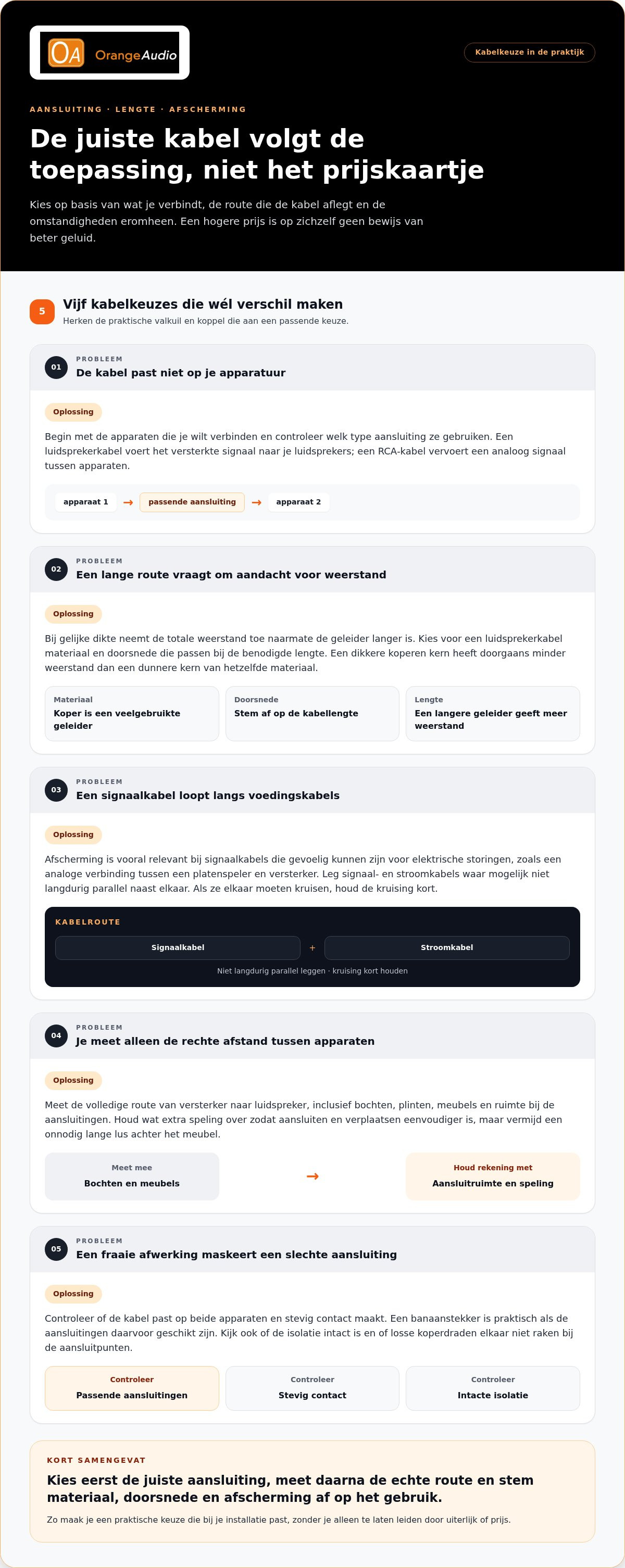
Start with the function of the cable. A speaker cable carries the amplified signal to your speakers, while an RCA cable carries an analog signal between devices. These applications have different requirements. This is how you debunk the myth of expensive cables: first choose based on connection and use, not on price or shiny finish.
Material and conductor thickness together determine how much electrical resistance the cable offers. Copper is a commonly used conductor; a thicker copper core generally has less resistance than a thinner core of the same material. With a speaker cable, both the material and the cross-section count. A long cable to a speaker on the other side of the room requires extra attention to that combination. With a suitable cross-section you prevent the cable itself from being an unnecessary restriction.
Length influences the total resistance: with the same thickness, the longer the conductor, the greater the resistance. Therefore, measure the route from amplifier to speaker, not just the distance in a straight line. Take skirting boards, furniture and the location of your equipment into account. Do not cut the cable exactly to the measured length; some extra play makes connecting and moving easier. Avoid an unnecessarily long loop behind the furniture.
Shielding is especially relevant for signal cables that can be sensitive to electrical interference. Consider an analog connection between a record player and amplifier, where cables run along a power cable. Shielding helps limit external influences, but does not replace good installation. Where possible, do not lay signal and power cables parallel to each other for long periods of time. If they have to cross each other, keep the intersection short and clear.
Also check the connections and finishing. The cable must fit the terminals of both devices and make firm contact. For example, a banana plug can be practical if the speaker and amplifier have suitable connections. Without a suitable connection, an attractive finish offers no solution. Also check that the insulation is intact and that loose copper wires are not touching each other at the connection points.
- First make a note of which devices you are connecting and what type of connection they use.
- Then measure the entire route, including bends and space for connections.
- For a speaker cable, choose a material and cross-section that suits that length.
- Use shielding where the signal connection and cable route will benefit from this.
Compare specifications per cable type. The same material designations do not automatically mean the same thing for a digital connection, analog signal cable and speaker cable. Therefore, choose a cable that technically fits, connects reliably and runs neatly through your room.
What do scientific tests show about cables for speakers and headphones?
A useful cable test does not start with a price tag, but with a specific question. Does the electrical signal change between amplifier and speaker, or between headphone output and headphones? A test can check this by comparing cables under similar conditions. Without a described test setup, the impression of one listener says little about the cable itself.
With a speaker cable, for example, you can measure resistance, capacitance and inductance. These properties can affect the signal, depending on the cable, its length and the connected equipment. In a laboratory you can compare the signal at the beginning and end. The amplifier remains the same and you always use the same speaker. This way you prevent a different setup from explaining the difference.
Fixed conditions are also important for a listening test. Use the same speaker, amplifier, music passage and listening position. Then only change the cable. Preferably do not show the listener which cable is connected. This way you limit the influence of expectations about brand, appearance or price. Repeat the comparison with the same fragments, for example a voice recording and music with clear low tones. Note what you observe for each listening session, instead of just giving a general impression afterwards.
Other components play a role in headphone cables. The output of a telephone or amplifier and the electrical properties of the headphones together form one system. Therefore, measure the signal at the headphones, not just the cable itself. Test the same headphones with the same source and only change the cable. Also pay attention to noise, interruptions in movement and a secure connection. These are practically relevant results, even if you notice no difference in sound.
- Compare one cable at a time and leave the other equipment unchanged.
- Use the same music passage and listening position for each comparison.
- Keep the connected amplifier and speaker the same when measuring.
- Also assess contact, flexibility and sound interruptions. move.
A measurable difference is not automatically audible. Conversely, an audible impression can be caused by a loose contact, a different connection or a changed setup. Therefore, first check whether both cables are securely attached and follow the same route. Then compare again, without changing the volume or equipment in between. This makes the outcome more useful for your listening position.
With this approach you can debunk the myth of expensive cables without choosing an outcome in advance. A good test makes it clear what difference you are investigating: electrical properties, reliability or an audible change. When comparing, listen to the overall sound, not just one striking detail. This way you link technical measurements to a concrete listening experience and base your judgment on a controlled comparison.
When can a more expensive cable offer a technical advantage?
A higher price only has meaning if the cable fulfills a demonstrable function in your setup. Consider a connection that is often disconnected, a plug that is difficult to reach behind equipment or a cable that has to go through a narrow cable duct. In such situations, choice of materials and construction can facilitate daily use. That is a practical advantage, but not automatic proof of better sound.
With a difficult placement, pay attention to the balance between firmness and flexibility. A stiff cable can put pressure on the connection in a tight spot. A more flexible casing can move along equipment more easily. At the same time, the cable must be strong enough for use. Therefore, assess the entire route, including bends and the movement that occurs when you connect or shift a device.
The connection itself can also explain an additional charge. A well-fitting plug makes reliable contact and can be useful if you regularly change equipment. First check whether the plug type is suitable for the connections of your devices. An additional lock or sturdy housing is only useful if it fits the entrance and the space around it. An unsuitable connection offers no advantage.
A more expensive version can also suit a permanent installation. Cables behind a piece of furniture are difficult to reach once everything is in place. Then a sturdy sheath or solid finish can help to make the connection suitable for the intended use. Above all, expect more convenience and a neat installation. A luxurious finish does not automatically change the properties of the amplifier, source or speaker.
Make a possible advantage concrete before you choose. Describe what you want to solve: does the plug fit poorly, is the cable often moved or does it have to go through a narrow cable duct? Then only compare properties that match that problem. This way you dispel the myth of expensive cables: you may pay extra for a construction that yields something in practice, not for a promise that has nothing to do with your situation.
- Choose a flexible cable when the route includes tight bends.
- Consider a robust connection when regularly changing equipment.
- Check the plug space behind furniture before choosing a cable.
- Show properties that does not need your placement.
Assess it soberly. A higher price may be justified by appropriate build quality, easier installation or more suitable connections. If your current cable fits properly and works reliably, there may not be a technical issue to resolve. So choose based on the use you have in mind. This way you pay extra for a concrete benefit, not just for a brand name or appearance.
What risks do cheap cables pose for safety and equipment
A low price does not automatically make a cable unsafe. Problems mainly arise from incorrect use, damage or poor connection. For example, a cable running through a doorway can become pinched when the door closes. This can damage the outer sheath and cause the connection to fail later. So check both the cable and the place where you use it.
Check the connection points of speaker cables carefully. Loose copper wires should not protrude or touch each other. Turn the amplifier off before disconnecting or reconnecting any connections. Then place the conductors neatly in the clamps and check whether they are secure. This prevents a careless connection from causing a short circuit or switching off the amplifier.
A damaged sheath requires attention, even if the cable still transmits sound. If you see a cut, a cracked spot or an exposed conductor, discontinue use of the cable. Instead of covering the damage with tape, replace it. Tape does not repair the cable structure. When disconnecting, pull on the plug, not the cord. This way you put less strain on the connection.
Also pay attention to cables in places where you walk or move furniture. A loose cable across a walkway can get snagged; it can be flattened under a chair wheel. Place it along a wall or behind furniture, without pulling it tight. If you move a cabinet, first check where the cable runs. This prevents a plug from being pulled out of a device or the cable sheath from tearing.
Distinguish between audio connections and power cables. A speaker cable and an RCA cable are for audio signals, not for mains power. Use the appropriate cord and connection for each device. An improvised connection can cause contact problems and cause equipment to operate incorrectly. Also keep cables away from sharp edges and areas where heat accumulates.
- Turn off equipment before reconnecting speaker cables.
- Replace cables with cut sheathing or exposed conductors.
- Put cords away from walkways and away from chair wheels and doors.
- Use audioand power cables for their own connection only.
An affordable cable that is intact and matches the connection can be used perfectly. The price does not indicate whether a cord is installed safely or is damaged by daily use. Therefore, check the cable route after connecting and again when moving equipment. This way you keep the installation clear and limit problems for yourself and your equipment.
For equipment with a battery, there is a separate point of attention in addition to the cable itself: according to the test, a battery temperature of around 20 degrees Celsius is favorable for the performance of the battery. That fact is about the battery, not about the quality or safety of an audio cable. So assess these things separately.
A suitable cable and a good connection are important, but in themselves they say nothing about the battery temperature. Conversely, a favorable battery temperature makes a damaged cable unusable. Therefore, check both parts separately: assess the cable for visible damage and keep the battery temperature in mind as a separate point of attention. This way you don't confuse one checkpoint with another.
How to choose the right cable length and connection without unnecessarily paying too much
Start with the devices you want to connect. For example, note: amplifier to speaker, record player to amplifier or streamer to receiver. Then look at the connections on both sides. An RCA cable matches analog jacks with red and white plugs; a speaker cable connects an amplifier to a passive speaker. This way you avoid paying for a cable that does not fit your equipment.
Then measure the route that the cable actually takes. Use a tape measure to trace the baseboard, curves and furniture, rather than estimating the distance in a straight line. If your amplifier is on the left of a cabinet and the speaker is on the right, measure along the planned cable route. Leave space to connect plugs and move equipment. Do not choose an extra long cable for no reason, but also prevent the connection from being taut.
With a speaker cable, check whether both ends are connected correctly. Amplifier and speaker sometimes have terminals and sometimes connections for banana plugs. Only use plugs that fit both devices. Connect left to left and right to right. Also keep the plus and minus marks the same on both sides. This keeps the connection clear and prevents confusion during connection.
For analog connections, check the type of connection and the number of connections required. A stereo signal via RCA typically uses a red and white connection on both devices. Before purchasing, check that the source and amplifier have the same input and output. The correct input is also important for a record player. An incorrect connection cannot be solved with a longer cable or a more luxurious finish.
- Note the devices and connections at both ends.
- Measure the entire route along walls, furniture and bends.
- Choose a length with connection space, without unnecessary excess cable.
- Check color markings, polarity and plug type before connecting. connect.
Then temporarily lay cables along the chosen route before permanently securing them. This way you will immediately notice if a door is stuck or a cupboard no longer fits properly. Keep the cable out of walkways and avoid sharp bends at plugs. In a stereo setup, you can route both speaker cables along similar routes. This keeps the installation clear and helps prevent left and right errors.
Only then compare the cable options that suit your connection and measured route. A longer cable or extra plugs are only useful if your setup requires them. This way you can make targeted choices based on equipment, distance and installation, without unnecessarily paying for features you don't use.
OrangeAudio: Bookshelf Speakers
OrangeAudio helps you find speakers that suit your listening position and equipment. Check out the bookshelf speakers if you're considering a compact setup. Don't just look at the size, but also at the connections and location of your amplifier and speakers. This way you determine which cables you need, which length is suitable and which connections are suitable.
Don't you want to combine a separate amplifier with speakers? Then also view active speakers. Depending on your design, floor-standing speakers or built-in speakers are also possible options. The right choice starts with your space, equipment and way of listening, not with the most expensive cable. Contact OrangeAudio to discuss your setup.
Prepare your listening position for the next step
View your cable choice as part of a complete listening setup. If you later replace speakers or place your equipment differently, check the connections and cable route again. This way you debunk the myth of expensive cables: the right choice starts with what your system needs, not with the highest price tag.
Do you want to further develop your complete setup? OrangeAudio offers bookshelf speakers, floorstanding speakers and active speakers. Which option is right for you depends on your space, equipment and listening habits. Therefore, don't just look at one cable, but also at how the parts work together and what listening experience you are looking for.
Take your wishes and the connections of your equipment into account during your orientation. This way you can determine more specifically which speakers suit your situation and which connections are required. Discuss your listening setup with OrangeAudio and discover an appropriate next step.