
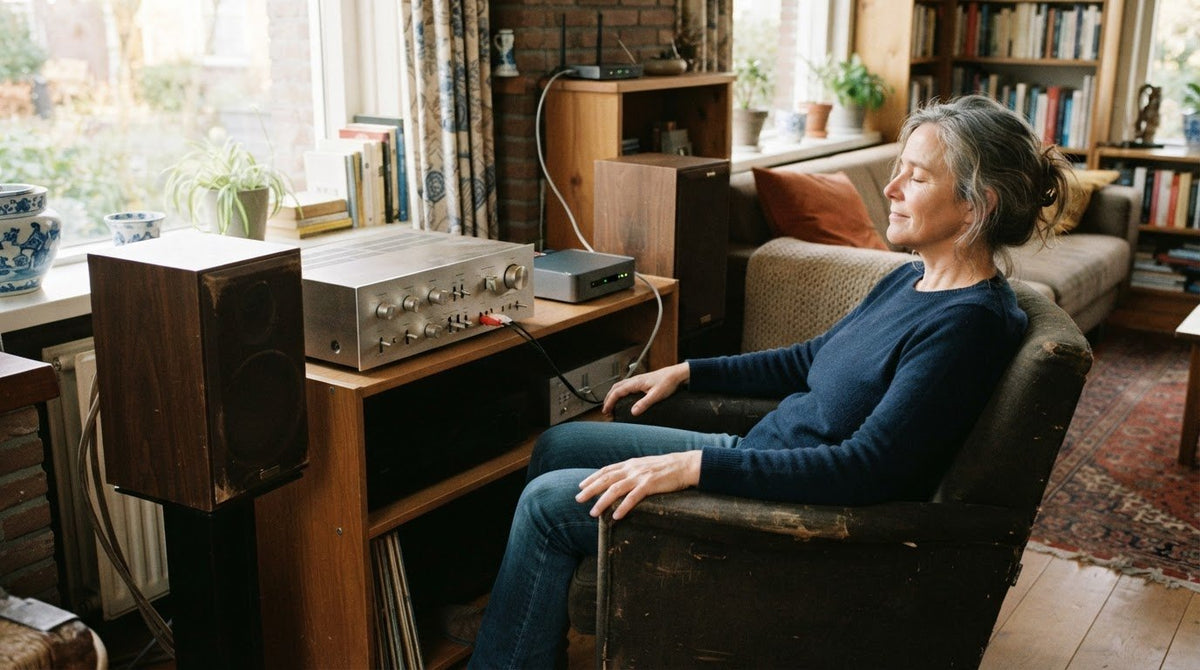
You don't need to replace vintage audio to stream at home. With an audio streamer you connect your existing amplifier to modern music sources, as long as you connect the streamer to a suitable input. For stable high-resolution Hi-Fi streaming, a constant speed of at least 10 to 25 Mbps is mentioned. This way you can make the step from vintage audio to a modern streaming system while retaining the familiar character of your set.
Maybe you especially appreciate the design, operation or sound of your classic equipment. That does not have to conflict with streaming. The network connection does play a role: Ethernet can help prevent interruptions, while the location of your router and streamer influences wireless reception.
In this article you can read how to connect a streamer to vintage equipment, what to pay attention to when making your choice and how to set up a stable connection. You will also discover how to maintain sound quality and when a new amplifier or a complete system is a logical next step. This way you can specifically determine what suits your listening room and existing installation.
Key points
- Keep your vintage amplifier and add streaming with a device that matches the available connections.
- Compare a separate streamer, Bluetooth adapter and network player for connection, operation and sound quality.
- Enhance the stability of streaming by paying attention to your home network and equipment placement.
- Keep an eye on sound quality by paying attention to the digital conversion and the connection to your amplifier.
- Discover how bookshelf Speakers and other speaker types can suit your listening room and installation.
Classic design with modern technology
Audio equipment changed significantly in the 20th century. Tube amplifiers, turntables and classic speakers defined the sound and appearance of many music systems. Especially in the 60s and 70s, tube amplifiers were known for their warm sound. In the 1970s, transistor amplifiers became the standard due to their affordability and reliability. That history explains why vintage equipment is more than just an object for many listeners. The wooden housing, metal buttons and tactile controls give a set its own look. Streaming can add a new function without having to replace the classic design.
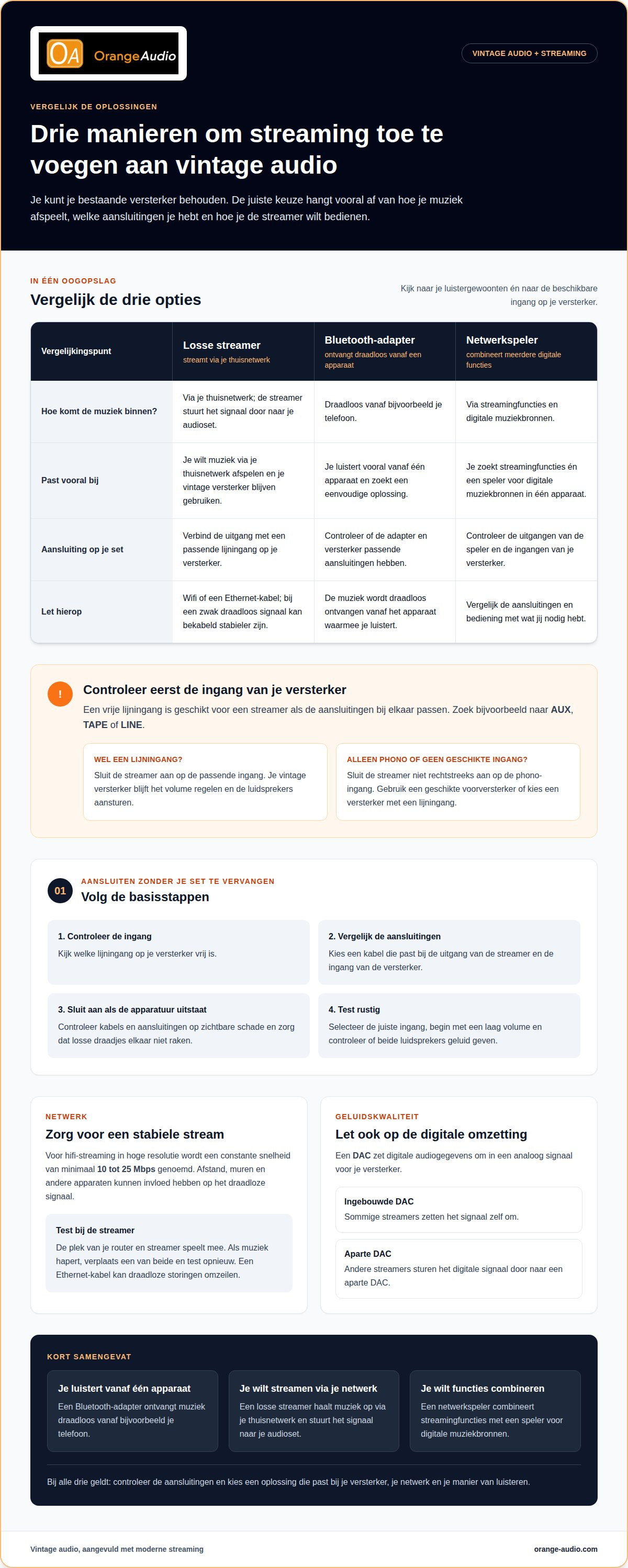
Start with the connections on your amplifier. On the rear panel, look for an available line input, often labeled AUX, TAPE, or LINE. You can connect a streamer to it if the output and input match. The amplifier continues to amplify the signal and your existing speakers reproduce the music. This way you keep your familiar setup and add a digital music source. Also check that the volume knob and input selector work properly. This way you avoid confusion when you use the new source.
How do you safely connect old audio equipment? Turn off the amplifier and unplug it before connecting any cables. Check cables and connections for visible damage and ensure that loose wires are not touching each other.
How do you integrate vintage speakers with a modern streaming system? Connect the streamer to a line input on the amplifier and leave the speaker cables in their existing connections. Then select the correct input and start at a low volume.
Then perform a simple connection check. Use a cable that matches the output of the streamer and the input of the amplifier. For example, an RCA cable is suitable for analog connections with red and white plugs. Connect left and right to the corresponding terminals. Turn on the amplifier and select the input to which the streamer is connected. Play music and increase the volume slowly. Do you hear sound from both speakers? Then check whether the balance knob is in the middle.
- Check which line input on the amplifier is free.
- Compare the connections of the streamer and amplifier.
- Connect the cables while the equipment is turned off.
- Test both speakers at a low volume.
The combination works best if each part has a clear has a task. The streamer receives music via the network and transmits the signal. The vintage amplifier controls the volume and drives the speakers. This way, the character of your existing set is retained. If you want to move from vintage audio to a modern streaming system, start with these basics: keep what works and add a digital source only when necessary. This way you combine classic design with contemporary listening convenience, without rebuilding your entire installation.
Streaming and stable connections
For stable streaming you need a reliable network connection and equipment that matches your amplifier. A vintage amplifier without a line input requires a different solution than a model with an AUX or TAPE input.
Does your amplifier only have an phonoinput or no suitable line input? Do not connect the streamer directly to the phonoinput. Use a suitable preamplifier or choose an amplifier with a line input.
Compare streamer, Bluetooth adapter and network player
A Bluetooth adapter receives music wirelessly from, for example, a telephone. That's a simple solution if you mainly listen from one device. A separate streamer retrieves music via your home network and sends the signal to your audio set. A network player combines streaming functions with a player for digital music sources. Be sure to compare the connections, controls and connections with what your listening habits require.
Required parts for streaming
For streaming you need a music source, a network connection and a suitable connection to the amplifier. A streamer usually uses WiFi or an Ethernet cable. If the wireless signal is weak, a wired connection may be more stable. Place the streamer within range of the router, or use a network cable if practical. Also check which input is available on your amplifier.
Maintain sound quality when streaming
The network connection and digital conversion both contribute to the listening experience. An DAC converts digital audio data into an analog signal for your amplifier. Some streamers have a DAC built-in; others forward the digital signal to a separate DAC. Choose the setup that suits your equipment and listening preference. Also check the settings of your music source, so that you know what quality you are playing in.
For high-resolution Hi-Fi streaming, the guideline mentions a constant speed of at least 10 to 25 Mbps. In 2026, Wi-Fi 7 will become the new standard for wireless stability. However, distance, walls and other devices also determine how strong the signal is at the location of your audio set. Therefore, test your connection at the streamer, not just next to the router. If music stutters, move the streamer or router and then try again. An Ethernet cable can bypass wireless interference.
Work step by step: first check whether the stream remains stable, and then adjust settings. Whenever possible, disconnect from other heavy networking activities during a listening test. Also listen to see if interruptions only occur at high resolution. This way you distinguish a network problem from a problem with a specific stream or setting. If you want to listen to music in multiple rooms, see how multi-room audio connects to your listening room and network.
What components are needed to make vintage audio suitable for streaming?
In addition to your existing installation, you need some practical facilities for streaming: a suitable playback device, access to a music service and a way to control the music. First map out what you already have. For example, check whether the home network reaches the location of your installation and whether you use a smartphone or tablet to select music.
You usually operate the streamer with an app on your smartphone or tablet. Install the corresponding app and have the network name and password available. Also check if your favorite music service is available in the app. This way you avoid discovering after connecting that your music source does not suit the way you want to listen.
For a clear preparation, you can check these requirements:
- A streaming device with support for the services you use.
- A smartphone or tablet for the initial setup and daily operation.
- Access to the home network at the location of your audio set.
- Access to the music service you want to play from.
- A free power socket and sufficient space around the equipment.
Check the network coverage at the installation site. A telephone with a good internet connection gives a first impression, but does not say everything about the connection of other equipment. Is the set in a cupboard or behind a thick wall? Provide space around the equipment and prevent metal objects from shielding the signal. If the connection fails there, you can also move the router.
Think about daily operation in advance. Do you want to use one landline telephone, or should multiple housemates be able to choose music? Check that everyone can install the necessary app and access the desired music service. If necessary, agree on who manages the playlist. This prevents another device from unexpectedly taking over the music.
Give each part a permanent place. Keep the streamer accessible and leave sufficient space around the amplifier for ventilation. A power strip can be useful if the set contains multiple devices. Make sure you recognize the plugs, for example by labeling them with the device name. This makes it easier to restart equipment or check settings.
Prepare briefly for the installation: collect your network data, check your music service and determine where you want to operate the equipment. This way you can see which facilities are already available and what you still need. This allows you to build a streaming setup that suits both your vintage set and the way you choose and share music at home.
What is the difference between a separate streamer, a Bluetooth adapter and a network player?
The best choice depends not only on the device, but also on how you listen to music at home. First map out your daily use. Do you usually listen alone, do housemates take turns or do you want to start music from different apps? These habits determine which controls remain pleasant once the installation is in place.
Start with your music services. Make a note of the apps you actually use and check which controls suit them. Also look at how you start music: directly in a music service, via your own playback app or from a device you already use. With clear controls, you have to search less between apps and switch sources less often while listening.
Then see how multiple users can operate the installation. In a household, everyone may use a different phone or tablet. Consider who chooses the playlist and how to prevent a new listener from interrupting the song in progress. Test the operation in advance with the devices used at home. This way you can quickly see whether the working method makes sense for everyone.
- Note which music services you open every day.
- Determine which devices should be able to operate the set.
- Note the steps needed to start music.
- Check how you switch between listeners and playlists.
Also think about where you put the music serves. If the audio set is in the living room, you may want to quickly select music from the couch. If the amplifier is in another room, range via the network is more important. Also see whether the solution fits your listening routine without always needing your phone as a permanent music source.
Make the choice concrete with a short test. Open your usual music app, find an album and start playing. Pause, resume, then choose another playlist. Repeat the test with a second telephone if roommates also operate the installation. This way you will notice whether the operation is intuitive and whether your favorite music services fit well with the chosen solution.
A well-organized layout makes daily use more pleasant. Give the controls a fixed place and use recognizable names for the devices in the app, such as 'living room'. This way you don't have to guess which installation to select. Pay attention to ease of use and listening habits in advance, so that the solution also suits your household after installation.
How do you maintain good sound quality when streaming via vintage audio equipment?
Start with the recording quality and the settings of your music source. A CD-quality stream has a resolution of 16-bit/44.1kHz. High-resolution streams can go up to 24-bit/192kHz. Those numbers describe the digital audio data, but don't tell everything about what a recording sounds like. The recording used and the entire signal path also play a role.
Check the quality in which the music app plays. Choose a setting that suits your subscription, network and equipment. A high resolution is of little use if the streamer or connected DAC cannot process it. Therefore, check the digital and analog outputs of the streamer and the input of your vintage amplifier. This way you prevent unnecessary conversions in the signal path.
Compare the same recording in the different available qualities. Use the same clip, same amplifier and same speakers. Keep the volume as even as possible, because a slightly louder version can sound fuller. As you listen, pay attention to vocals, instruments, and quiet passages. This way you can assess details and balance, not just the volume.
- Check the stream quality set in the music app.
- Always compare the same recording and the same fragment.
- Use one input and do not change multiple settings at the same time.
- Make sure the volume is the same for each listening test.
Also pay attention to the analogue connection. An RCA cable carries the signal from the streamer to a line input of the amplifier. Insert the plugs firmly and check that left and right match. If the output of the streamer is set high, start with a low volume on the amplifier and gradually increase it. This way you prevent an unexpectedly loud signal from disrupting your listening test.
Do you hear noise, distortion or difference between the channels? Then change one part at a time. First test a different input on the amplifier, then a different cable, then a different stream quality. Make a note of what you adjust. This makes it easier to find the cause without changing the settings of the app, streamer and amplifier at the same time.
Finally, pay attention to the placement of your vintage equipment. Keep ventilation openings clear and do not route signal cables tightly next to power cables. Play a familiar album and listen at normal volume. If you also want to hear music outside your listening position, check out multi-room audio. If you want to keep your existing installation, check out the audio streamers.
OrangeAudio: Bookshelf Speakers
OrangeAudio offers Bookshelf Speakers for those who, in addition to streaming, also want to revisit the speakers in the listening room. This way you can keep your vintage amplifier and investigate which speakers suit your room and listening preference. When comparing, pay attention to the available space, the placement and the way in which your current amplifier is connected.
Do you want a different setup? Then also compare Floorstanding Speakers, Active speakers and built-in speakers. First decide what you want to keep: just the amplifier or also your existing speakers. This makes it clear which combination of streaming equipment and speakers suits your plans.
View the options at OrangeAudio. If you want advice about your audio set, please contact us.
Give your audio set the next step
Switching from vintage audio to a modern streaming system does not mean that your entire listening setup has to be change. See it as an opportunity to consciously choose what you want to keep and where you want to explore new possibilities. Maybe your current set still fits well with your listening room, or you want to re-tune your speakers to how you experience music.
OrangeAudio offers Bookshelf Speakers, Floor-standing Speakers and Active speakers. When making your choice, take the space, the desired placement and the use of the installation into account. This way you focus the next step on your listening environment and avoid choosing equipment you don't need.
Want to discuss your options or see which speakers suit your plans? Contact OrangeAudio and discover which direction suits your set.
Frequently asked questions
How do you connect a streamer to a vintage amplifier with RCA inputs?
Connect the left and right output of the streamer to a free RCA line input, such as AUX or TAPE. Use a stereo cable: White is left and Red is right. Turn off both devices before connecting the cable. Then select the correct input and start with a low volume. Do not use the PHONOinput, which is intended for a record player. Check which outputs and connections both devices have before connecting them.
Which streamers work with Spotify Connect, Tidal Connect, AirPlay and Chromecast?
Support varies by streamer and music service. The Hifi Rose RS520 supports Spotify Connect and AirPlay. For Tidal Connect or Chromecast, choose a streamer whose product specifications explicitly mention those features. Support for Spotify Connect or AirPlay does not automatically mean that the other platforms will also work. Therefore, compare the services you use with the functions of the device. Also consider whether you want to control music from the service itself or from a streamer app.
How do you set up a streamer on WiFi and control it with a smartphone?
Download the control app for your streamer and connect your phone to the home network. Start the installation in the app, choose your Wi-Fi network and enter the password when prompted. Also connect the streamer to the same network. Select the streamer in the app and choose music. Your smartphone then serves as a remote control for play, pause and volume.